Every feature

Every feature. Every way in. Read by AI.

A free wellness app for iPhone, iPad, Apple Watch and the web. Four areas, Sleep, Eat, Move and Relax, filled however suits you: say it, snap it, scan it or let your watch send it. Wave AI reads all of it, calls the day ahead and marks which way every number is heading.

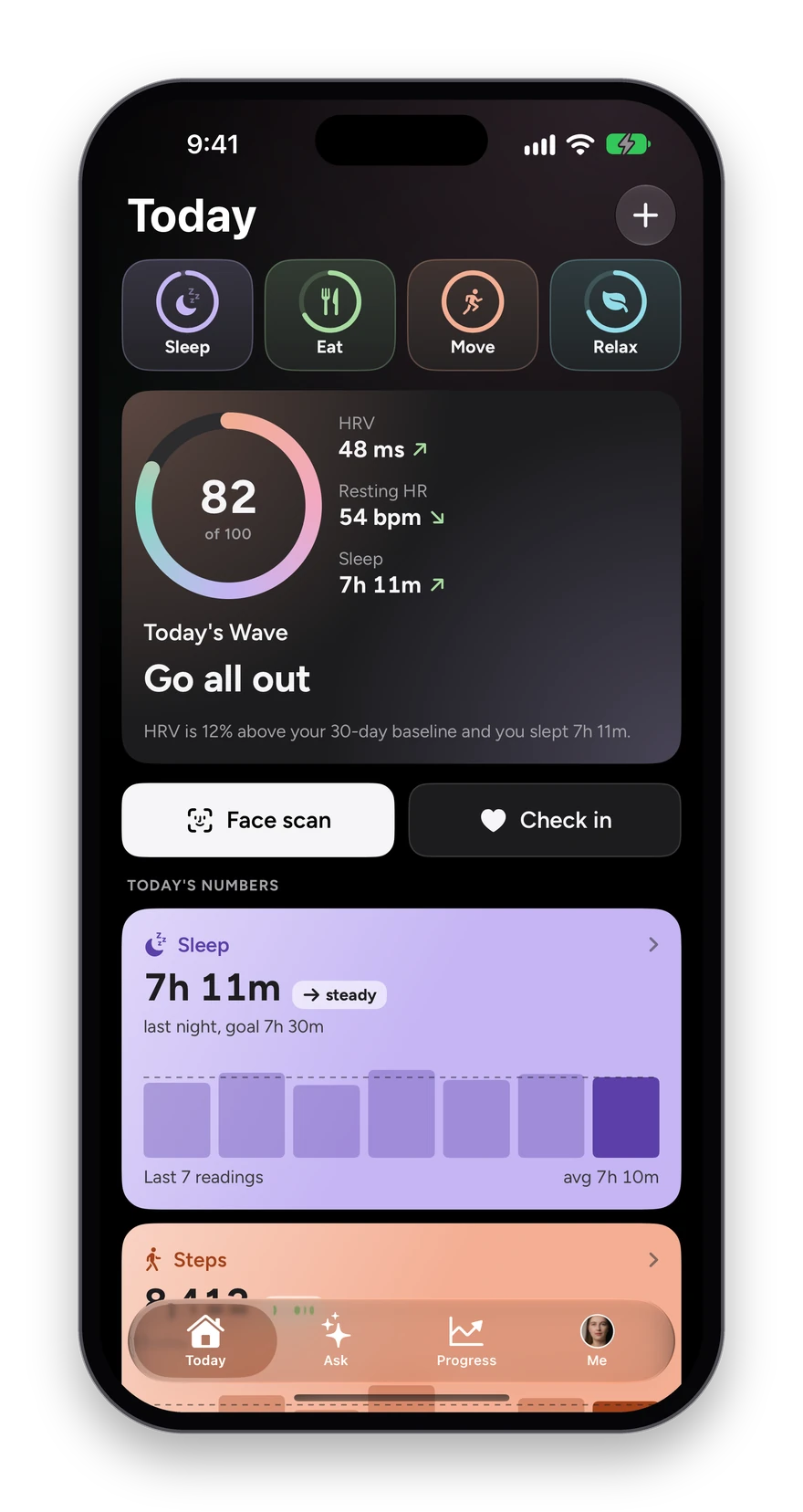
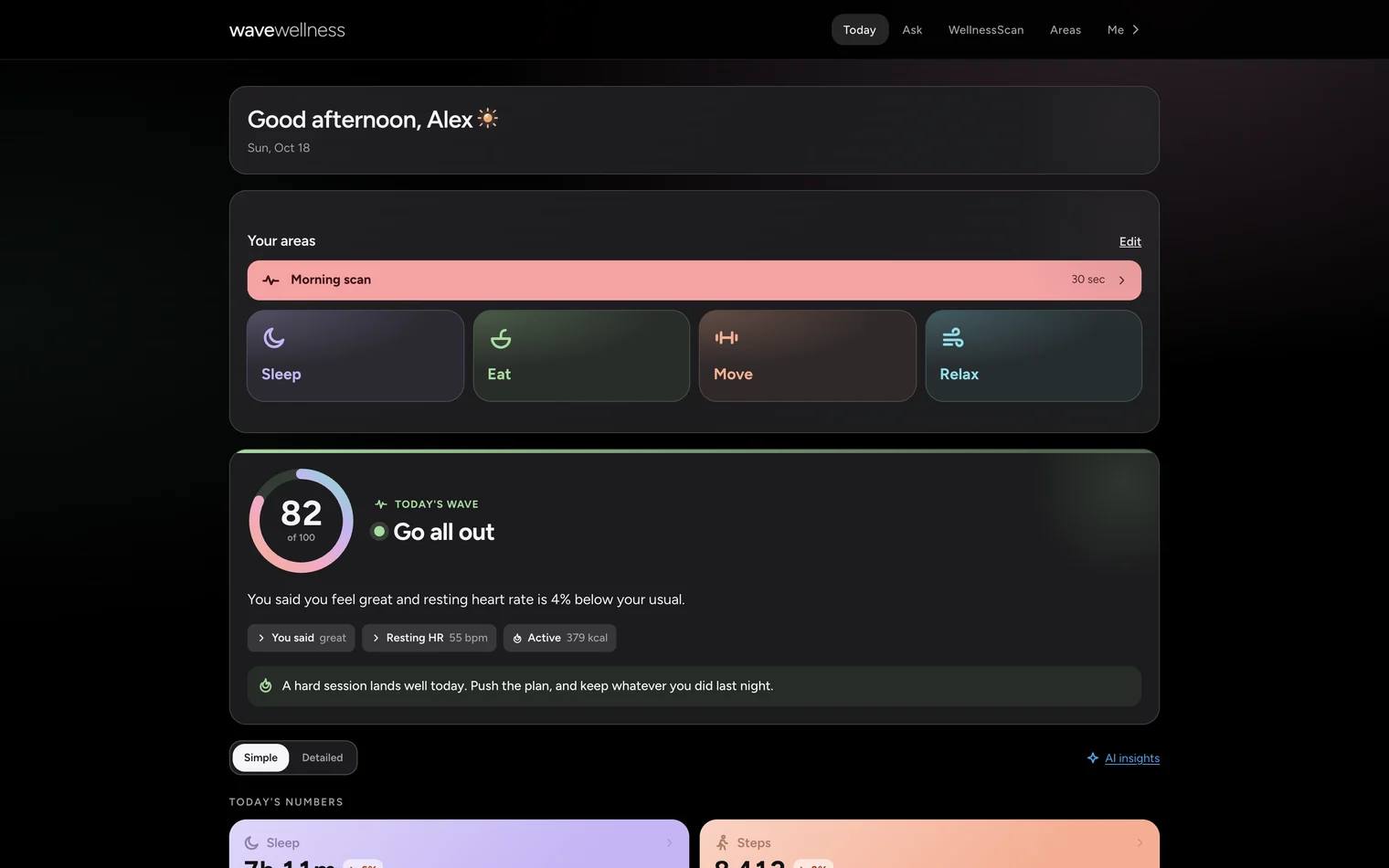
The Today screen: Sleep, Eat, Move and Relax shortcuts, and Today's Wave at 82.
The walkthrough

Every feature, screen by screen.

Real screens from the app, what each one shows, and the steps to use it. Jump to any feature.

  • 24features, each walked throughevery one a real screen from the app
  • 0 to 100the daily Wave scoreHRV, resting heart rate, sleep, strain and how you feel
  • 40seconds for the WellnessScanheart rate, breathing and HRV, no strap and no cuff
  • 5questions in the check-inten seconds a morning, and the streak that comes from it
01 · Today

One score each morning, and the reason for it.

Open the app and the Today screen answers the first question of the day: how ready are you? Your Wave is a single number from 0 to 100, built from your HRV and resting heart rate against your own baseline, last night’s sleep, yesterday’s strain and how you said you feel, with one sentence that says what moved it.

How it works

  1. Open the app. Your four areas sit at the top as shortcuts: Sleep, Eat, Move and Relax.
  2. Read Today’s Wave: the number, a call for the day such as “Go all out”, the three signals that moved it, and the sentence behind it.
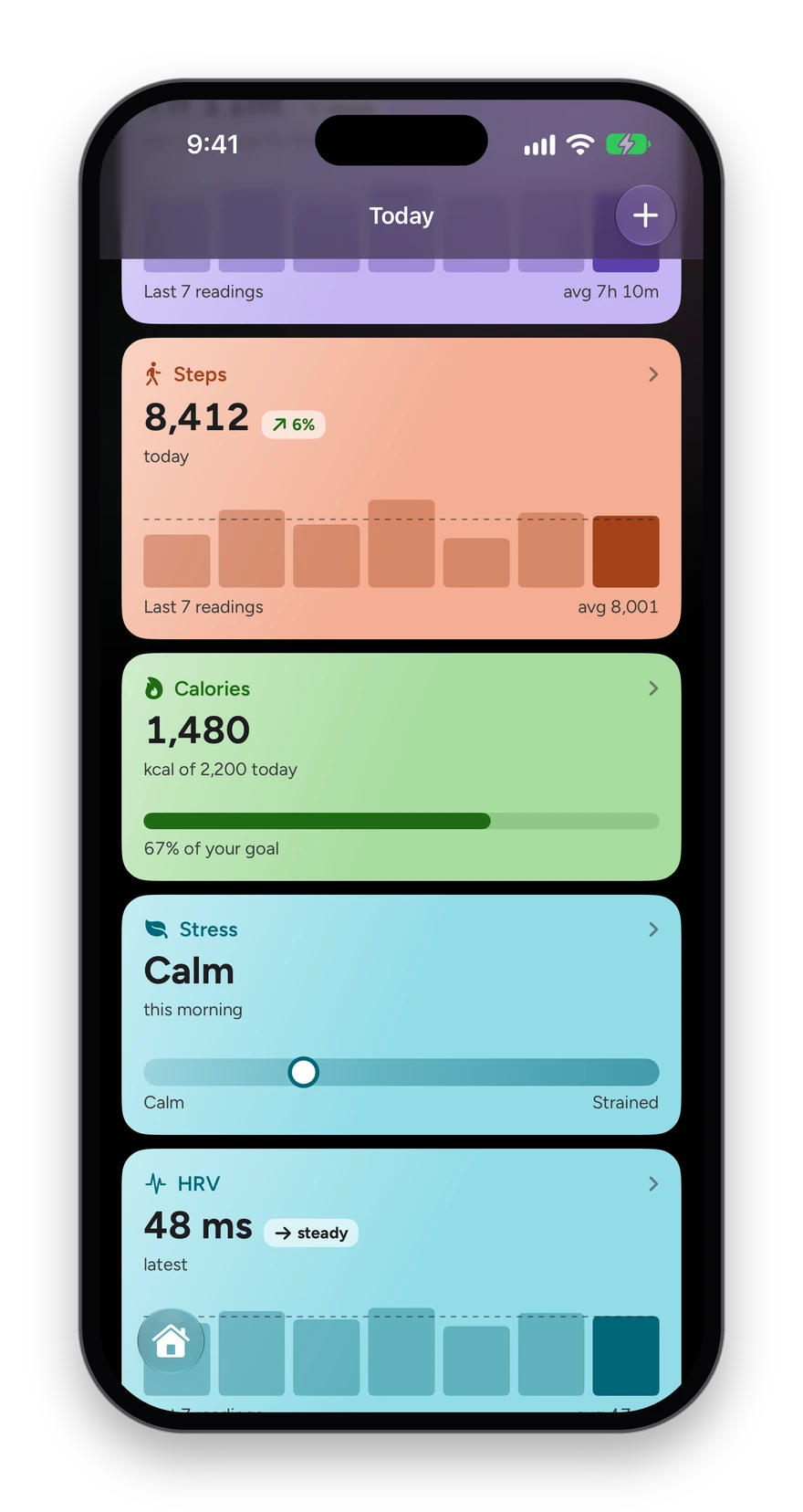
  3. Scroll Today’s numbers: sleep, HRV, resting heart rate, steps, stress and more, each with its week drawn edge to edge and an arrow when it is up or down on your usual.
  4. Tap any number to open its full history.

What you see

  • Every morning is read against your own 30-day baseline, not a population average.
  • Every number marks whether it is up or down on your own week, in green when that is good news.
  • One plain tip for the day, written from what the numbers actually say.
  • On a morning with too little data, it says so instead of guessing.
The Today screen: Sleep, Eat, Move and Relax shortcuts, then Today’s Wave at 82 of 100, Go all out, with the three signals that moved it.
Today’s numbers: sleep, HRV and resting heart rate, each with its week as bars, its average and an up or down arrow.
02 · Wave AI

Say it or type it. Wave AI logs it.

There is one box for everything, at the bottom of Ask and of the Sleep, Food and water, Workouts and Supplements screens. Talk into it or type a line, the way you would tell a friend, and Wave AI turns what you said into entries: a workout with its sets, a meal with its protein, a glass of water, a supplement taken, last night, your weight, or a whole new routine. You check them, and nothing is saved until you tap Log it.

How it works

  1. Tap the microphone and say it, or type a line: “bench, three sets of five at 185, then my usual shake.”
  2. Read what Wave AI heard: each entry on its own card, with the numbers it filled in.
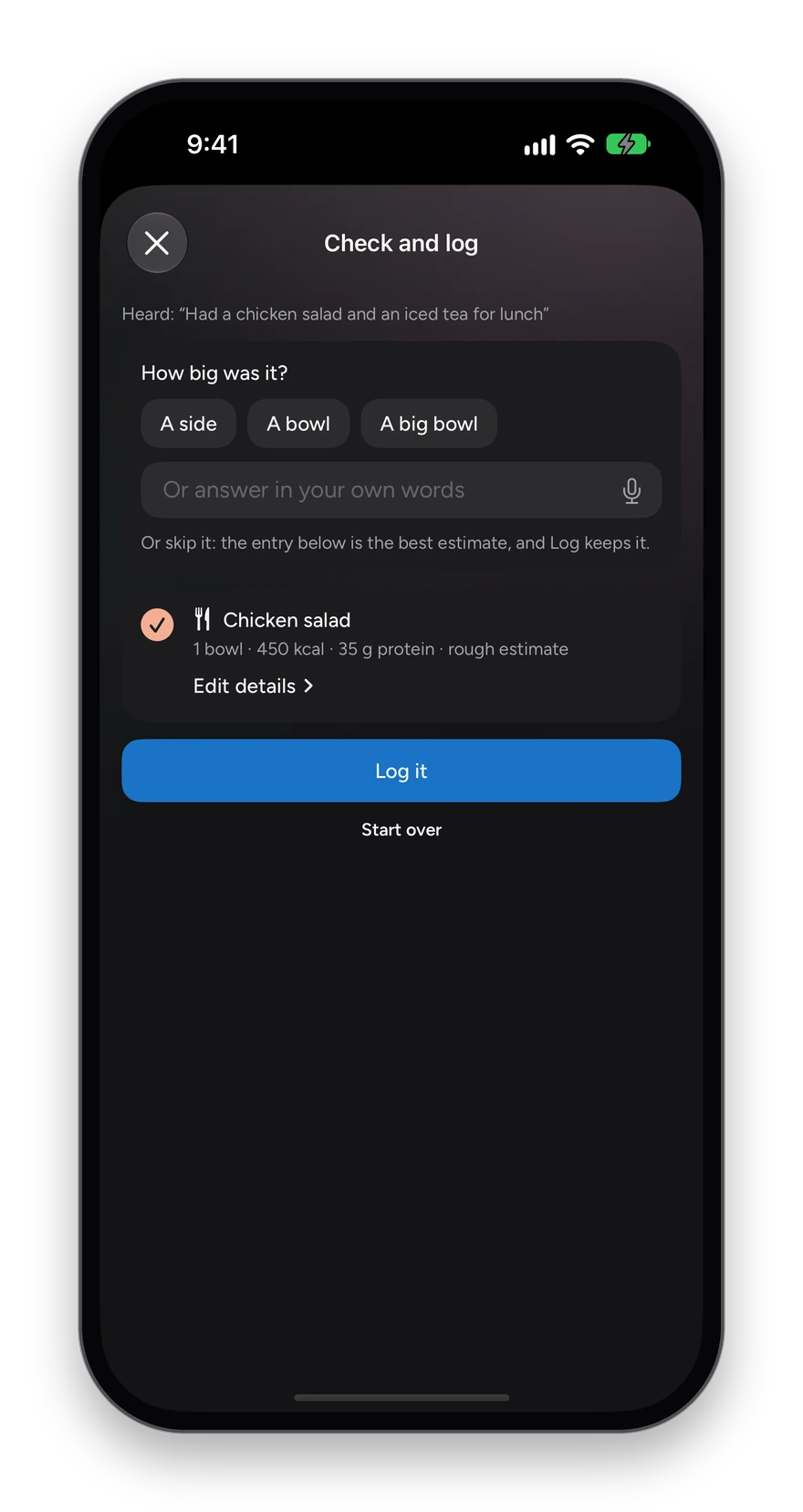
  3. Answer a quick question if it asks one, such as how big the salad was. It asks at most two, and only when it needs to.
  4. Tap Log it, or Edit details on any card to change a number first.

What you see

  • The + in the same box reads a photo of a plate, a photo of a label, or a barcode.
  • It learns your usuals, so “my usual breakfast” is enough; Profile lists what it remembers, and you can forget any of it.
  • Sets logged through a session land in one workout, and a saved workout can be renamed and edited later.
  • Every entry is shown before it is saved, and the detailed forms are still there when you want them.
Ask after typing Had a chicken salad for lunch: Wave AI has read a chicken salad and asks how big it was, with A side, A bowl and A big bowl.
03 · Areas

Everything you track, in four areas.

Sleep, Eat, Move and Relax sit at the top of Today. Tap one for its own screen: every number in that area with its week charted, and a plus that logs only what belongs there.

How it works

  1. Tap Sleep, Eat, Move or Relax at the top of Today.
  2. Read the area’s numbers, each with its trend against your usual.
  3. Tap the plus in the bar to add something for that area: a night, a meal or a supplement, a workout or your weight, a check-in or a journal entry.
  4. Open any number for its full history.

What you see

  • The plus offers only that area’s kinds, so logging is one tap shorter.
  • Sleep holds last night and sleep sounds; Relax holds stress and breathing, Wave Reset, sleep sounds and your journal.
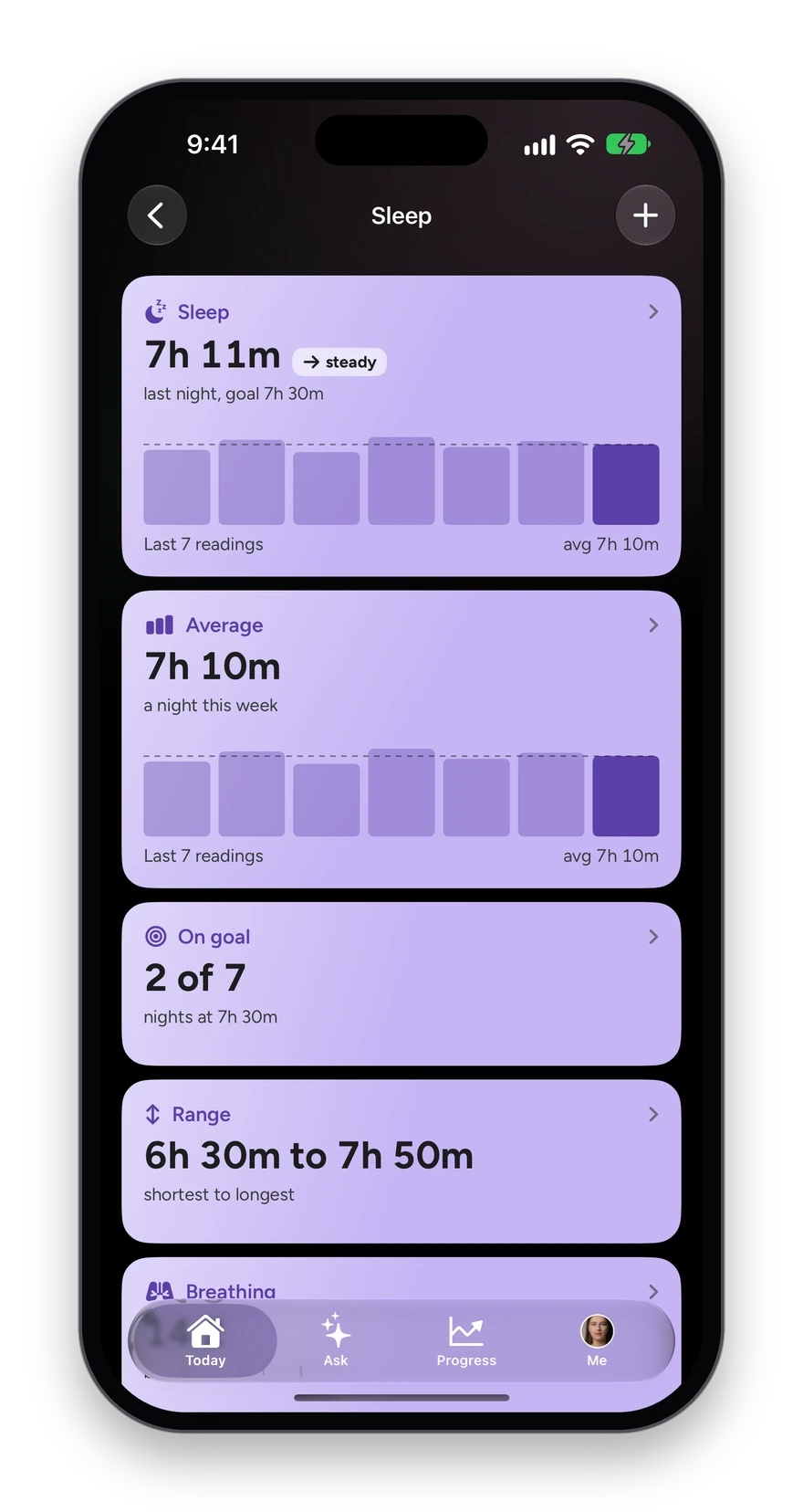
The Sleep area: last night’s sleep, bedtime and deep sleep, each with its week charted and a trend arrow.
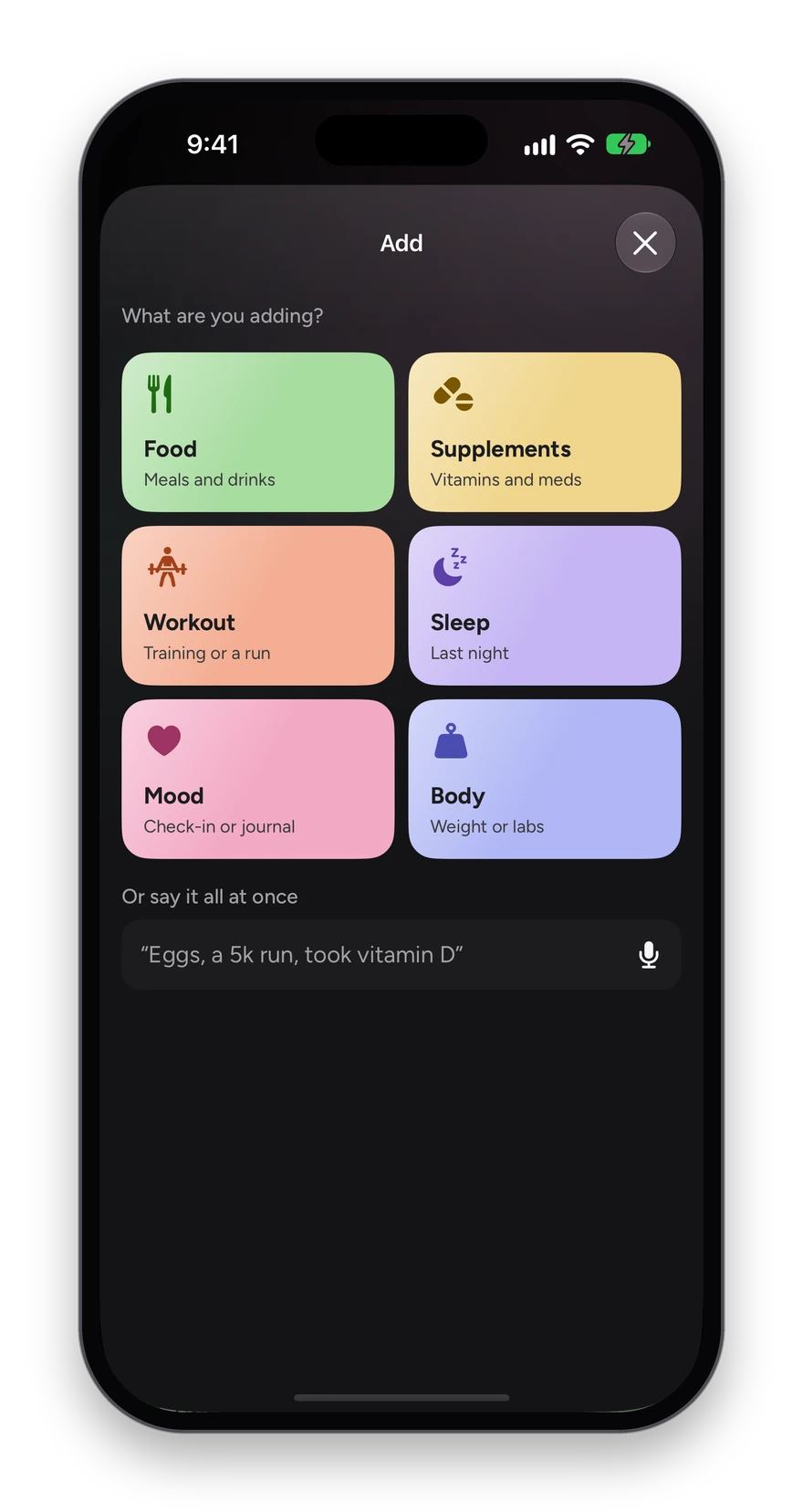
The add sheet: food, supplements, a workout, sleep, mood or body.
04 · Check-in

Five questions, about ten seconds.

The check-in is your side of the story: how you feel, which no sensor can read. Five quick taps a day turn into the mood and energy lines the rest of the app reads.

How it works

  1. Take the morning scan and the five questions follow it, or tap Check in on Today.
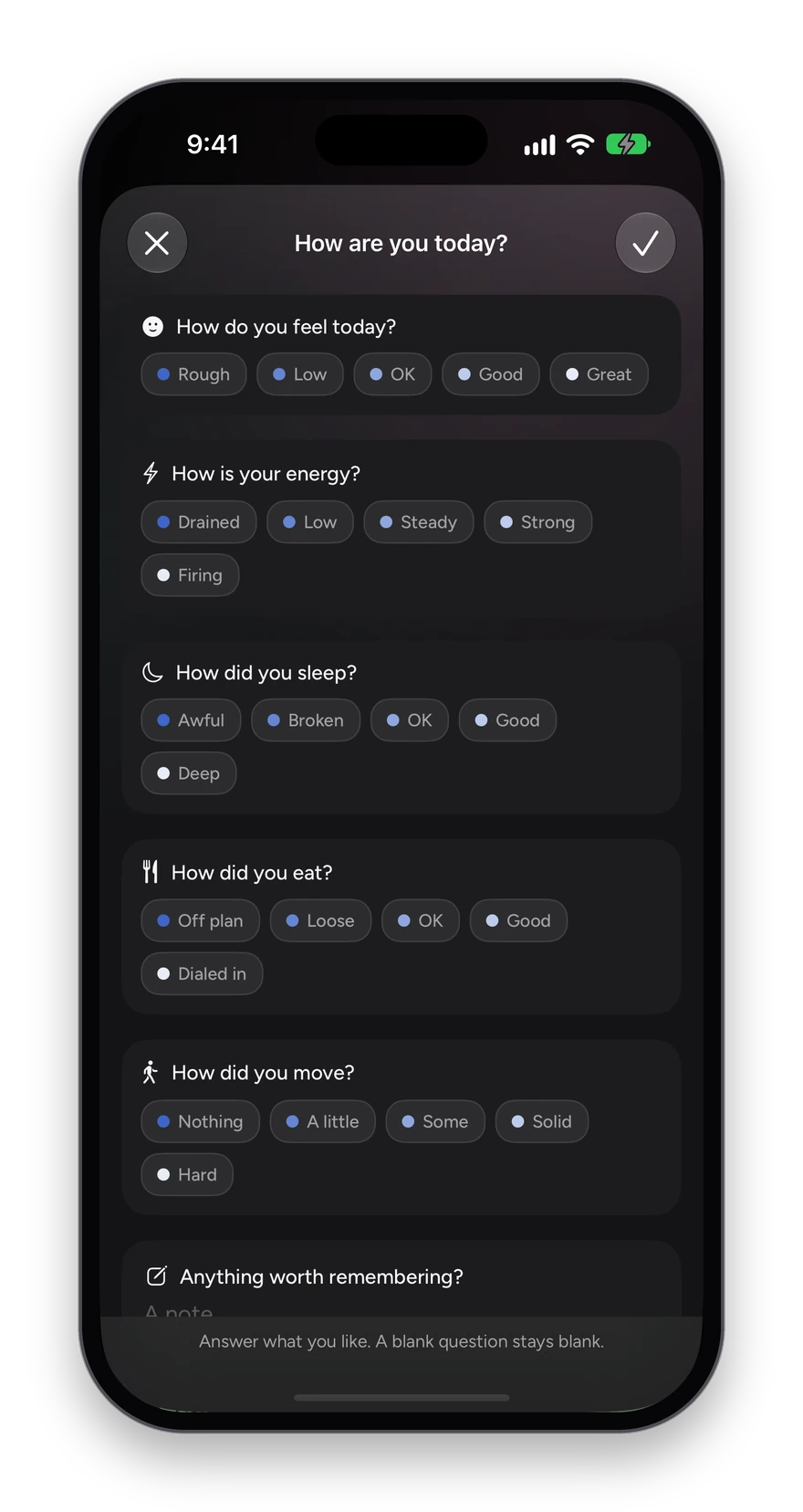
  2. Answer five questions with one tap each: how you feel (Rough to Great), your energy (Drained to Firing), your sleep (Awful to Deep), how you ate (Off plan to Dialed in) and how you moved (Nothing to Hard).
  3. Add a note if anything is worth remembering, or leave it blank.
  4. Save with the check. Your streak and the last two weeks update straight away.

What you see

  • A streak counter for the days you checked in running, in Progress under Check-ins.
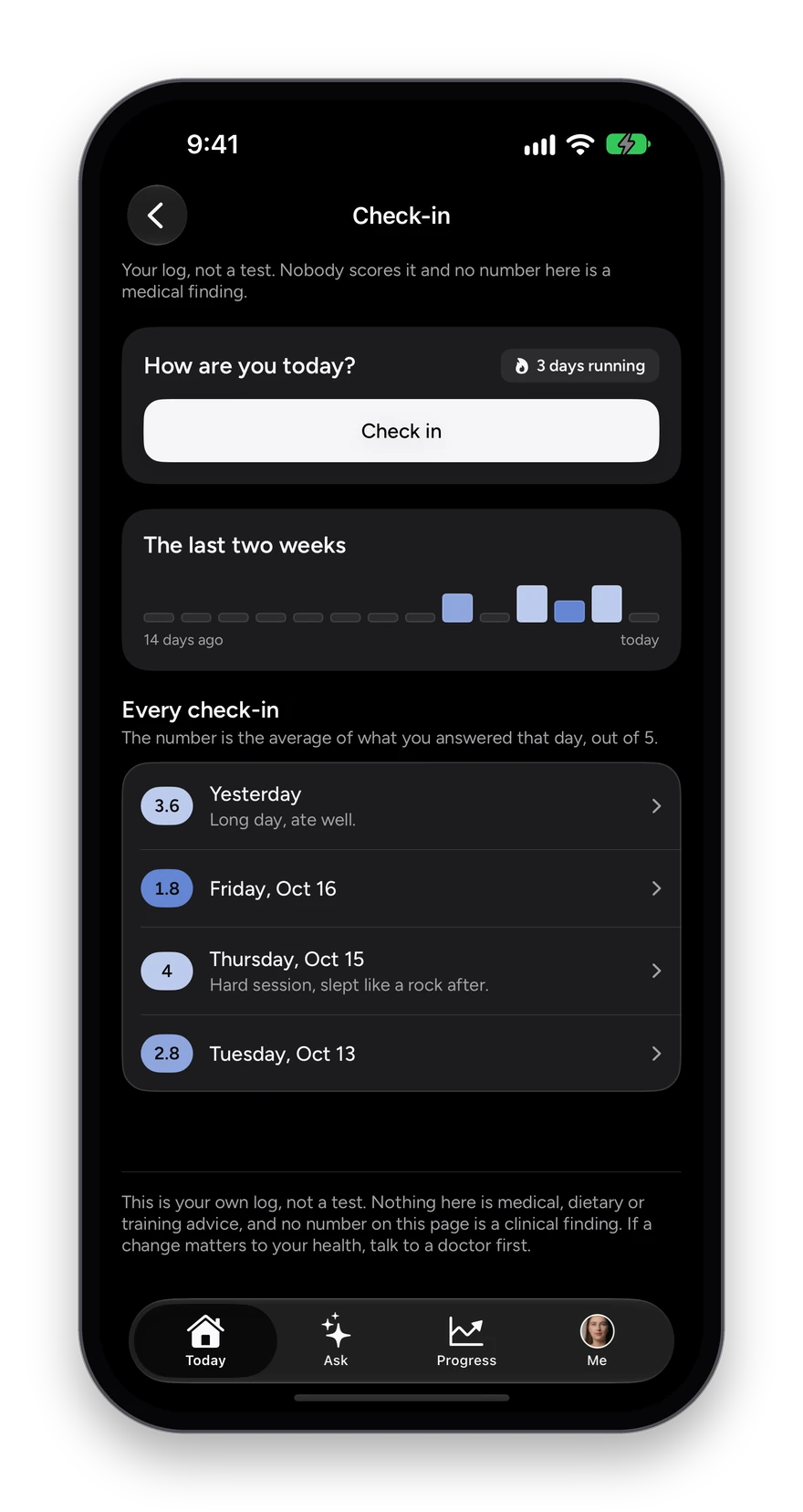
  • Every past check-in listed there with its average out of 5 and your note.
  • Your log, not a test: nothing is scored against anyone else.
The check-in sheet: How are you today? with one-tap answers for feeling, energy, sleep, eating and movement.
The check-in history: a three-day streak, the last two weeks as bars, and each day’s average out of 5 with its note.
05 · WellnessScan

Your heart rate, from the camera you already have.

Hold your phone at arm’s length and look at it for about forty seconds. The WellnessScan reads your heart rate, breathing and heart-rate variability from color changes in your skin too small for an eye to see. No strap, no cuff.

How it works

  1. Tap Face scan on Today, just under Today’s Wave.
  2. Frame your face in the circle. The screen brightens and becomes the light, so a dim room still reads.
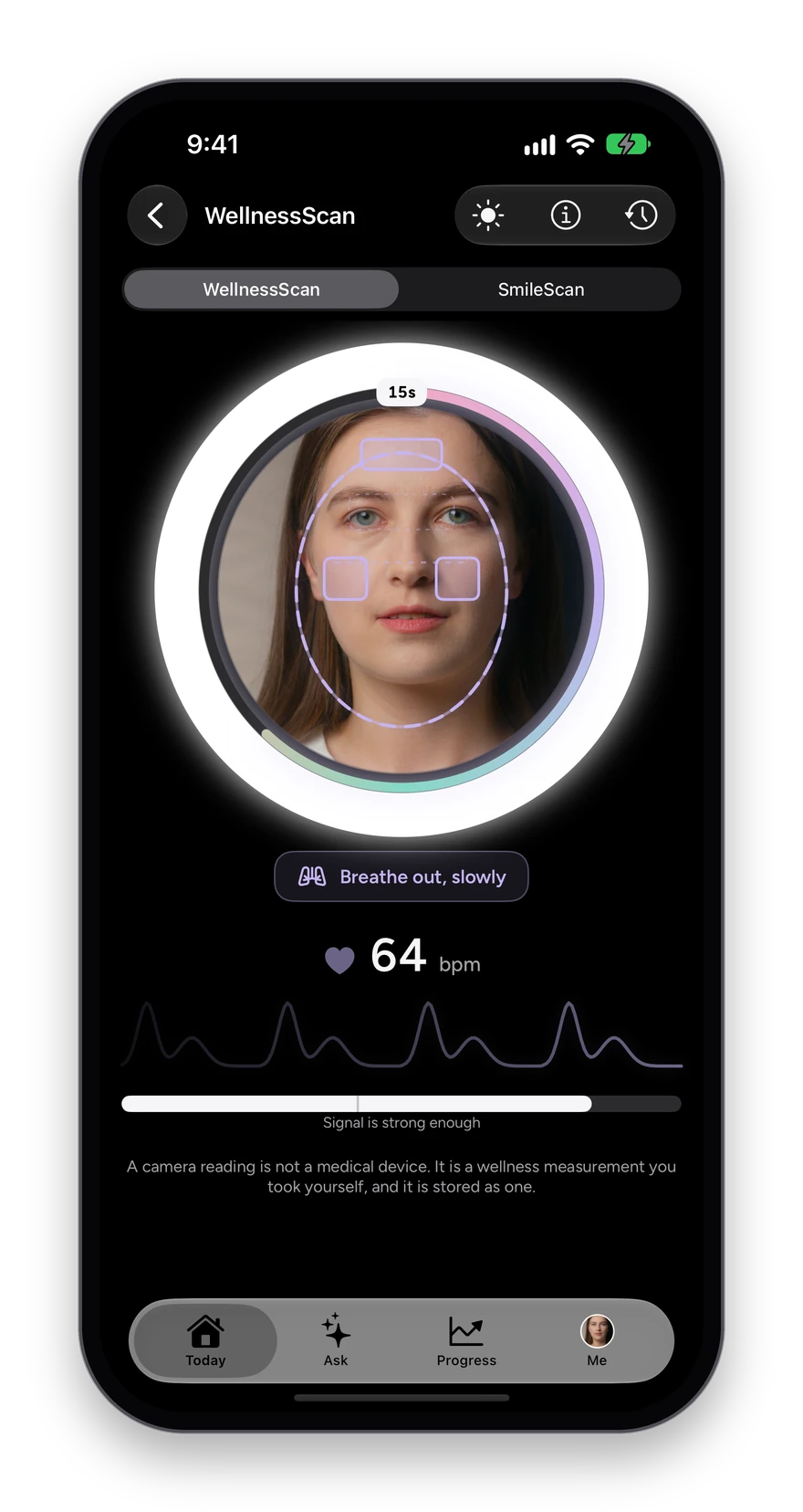
  3. Breathe with the coach (“Breathe out, slowly”) and hold still while the ring fills.
  4. Watch your pulse appear live, then save the reading to your record.

What you see

  • A live heart rate and pulse wave while you scan.
  • A signal meter that tells you when the reading is strong enough.
  • Breathing rate, heart-rate variability, blinks a minute and how alert you look, each explained.
  • A reminder at the time you choose, and a streak for the mornings you scan.
  • Every scan saved to your history, compared with your usual.
  • Also runs in a web browser on a laptop, into the same history.

How the WellnessScan works

The WellnessScan mid-reading: a face framed in a glowing ring, Breathe out, slowly, and a live 64 bpm with the pulse wave below.
06 · SmileScan

Your teeth and gums, against your own baseline.

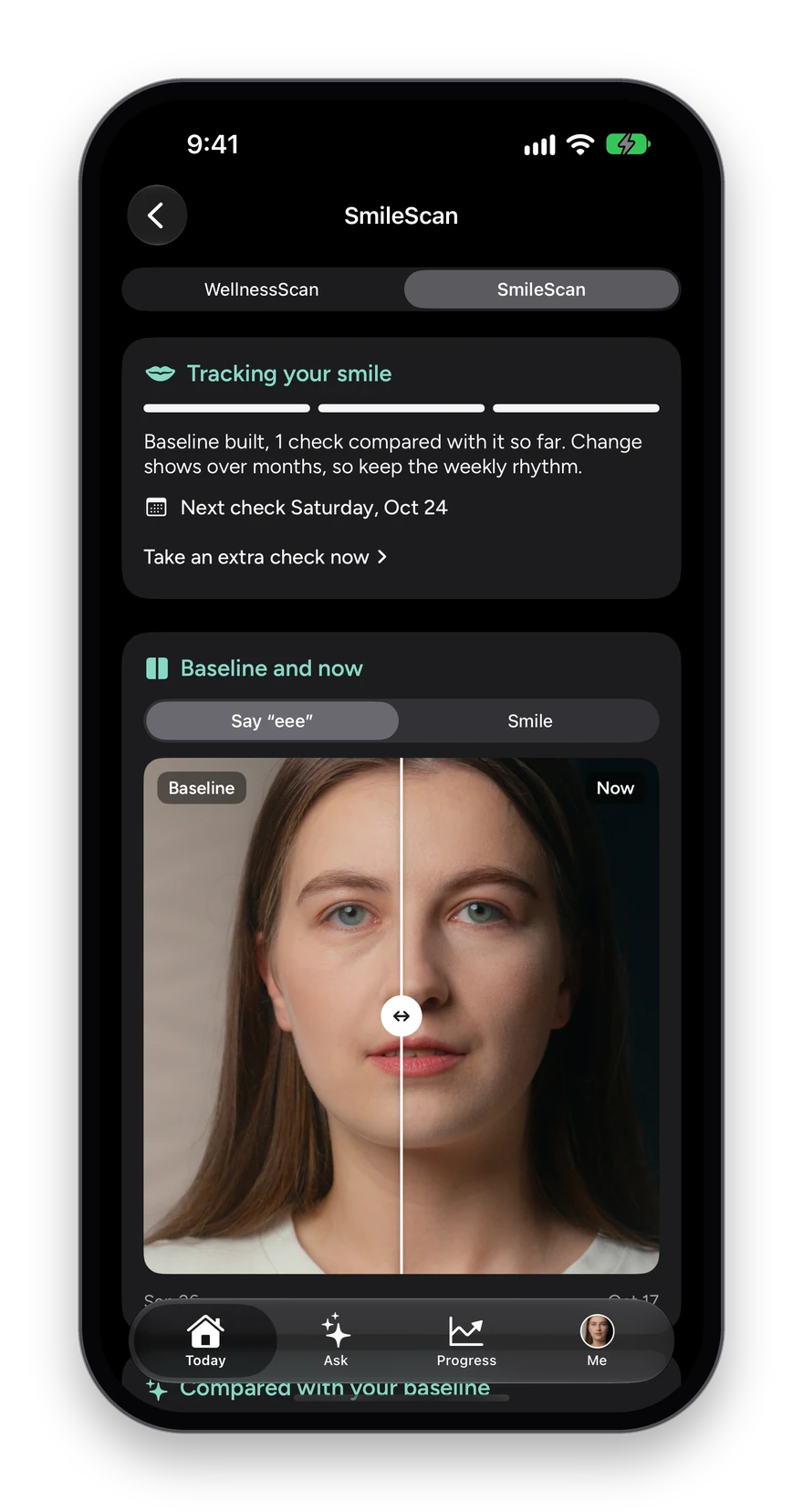
Two photos once a week, on the same scan screen as the WellnessScan. The camera frames your mouth and takes each photo itself once it is lined up, with your baseline faintly over the camera so every week matches the first.

How it works

  1. Tap Face scan on Today and switch to SmileScan at the top, or open SmileScan from Me.
  2. Take two photos, a smile and a “say eee”. The camera fires on its own when you are lined up.
  3. Three weekly checks build your baseline.
  4. From week four, read what changed area by area, and slide between your baseline and this week on the same photo.

What you see

  • Tooth position, the gum line, gum color, shade and stain, buildup, chips and wear.
  • A reminder for the next weekly check, with an extra check any time.
  • Never a diagnosis. When something is worth a word with your dentist, it says so.

How the SmileScan works

The SmileScan: tracking your smile with the baseline built, and a baseline and this week’s photo split by a slider.
07 · Wave Age

How old your body is acting, and why.

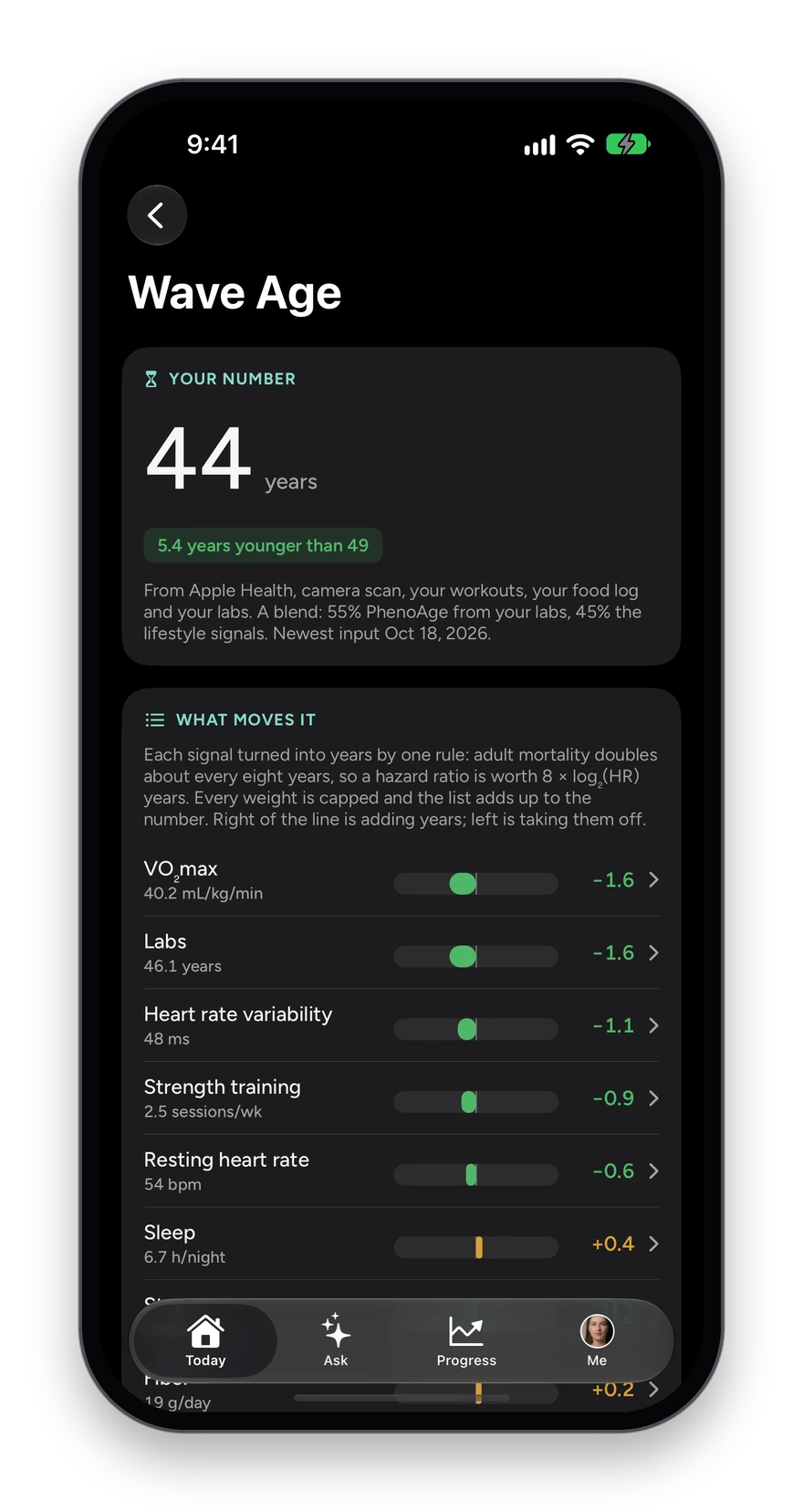
Wave Age is one biological age built from your labs and your lifestyle, on a published model. Every year is attributed to the signal that produced it, so you can see exactly which habit is adding years and which is taking them off.

How it works

  1. Open Progress and tap Wave Age.
  2. Read your number beside your real age, and how far apart they are.
  3. Scroll What moves it: VO₂max, labs, heart-rate variability, strength training, resting heart rate, sleep and more, each with the years it adds or removes.
  4. Tap any signal to see where it comes from and what would move it.

What you see

  • A blend of your bloodwork (PhenoAge) and your lifestyle signals, with the split shown.
  • Nine markers or no number: a missing marker is named, never filled with an average.
  • Set a Wave Age goal and watch the number travel toward it.

How Wave Age is calculated

Wave Age: 44 years, 5.4 years younger than 49, and What moves it, with VO2max, labs, heart-rate variability, strength training and resting heart rate each adding or removing years.
08 · Sleep

Last night, and the last two weeks.

Sleep shows the night you just had and how it fits the pattern. Duration comes from your wearable, how it felt comes from you, and both sit on one screen.

How it works

  1. Tap Sleep at the top of Today, then Sleep log.
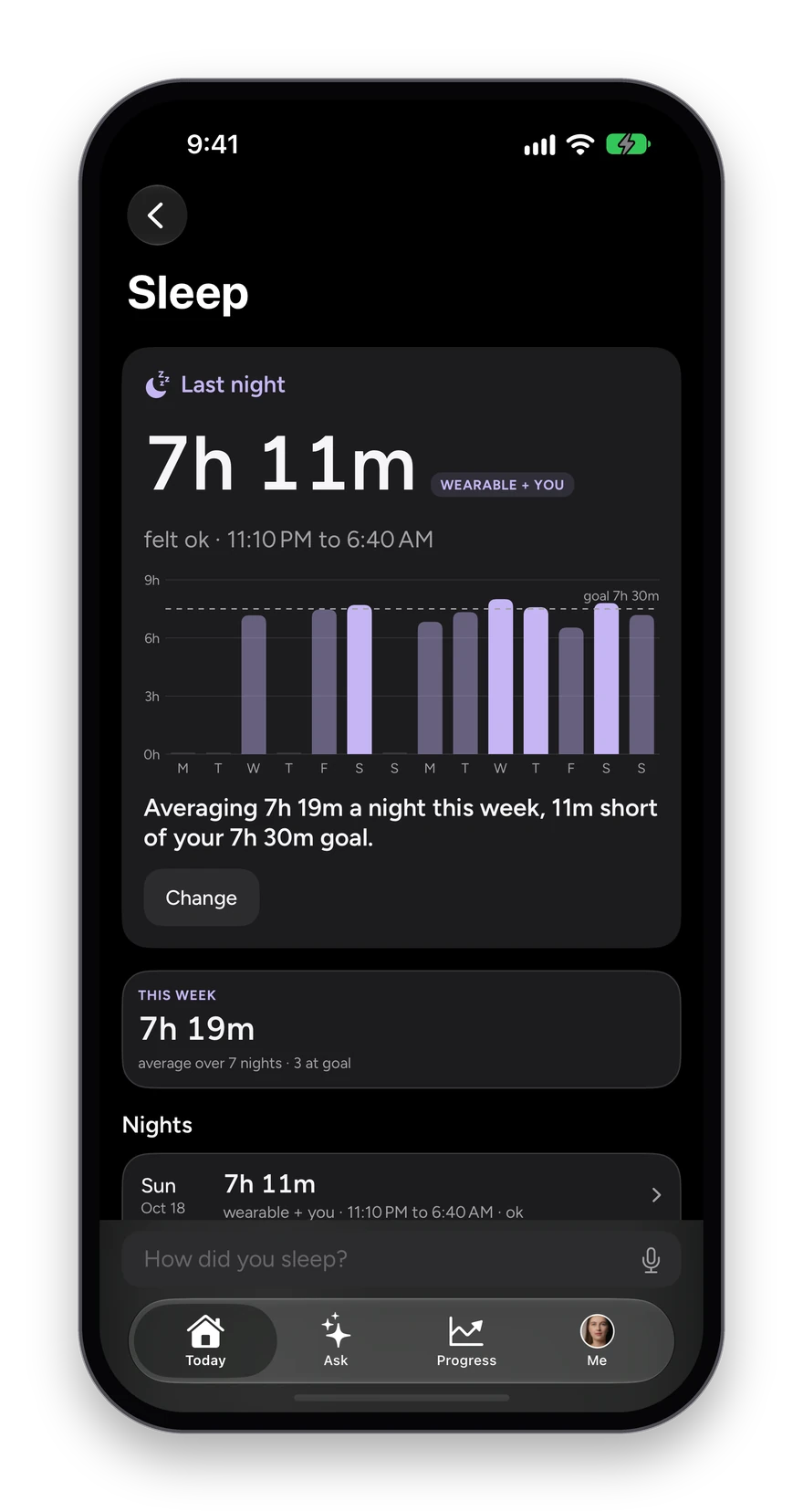
  2. Read last night: hours asleep, how it felt, and when you went to bed and woke.
  3. Check the past two weeks against your goal line, and the sentence that says how far off it you are.
  4. Tap Add how it felt, or Change, to note how a night felt, or open any night in the list. Set your sleep goal in Goals.

What you see

  • Wearable data and your own log marked so you know which is which.
  • Deep and REM sleep from your wearable, when it reads them.
  • Bedtime regularity and the week’s sleep debt, each in a plain sentence.
  • Your weekly average beside the goal you set.
  • Log a night by hand when you slept without a device.
Sleep: last night 7h 11m, felt ok, 23:10 to 06:40, two weeks of bars against a 7h 30m goal line, and the averages.
09 · Workouts

Every session, in one week at a glance.

Workouts pulls your sessions in from your watch and adds what you log yourself. The week is summed up at the top, so you know where you stand before the next session.

How it works

  1. Open Move from Today, then Workouts.
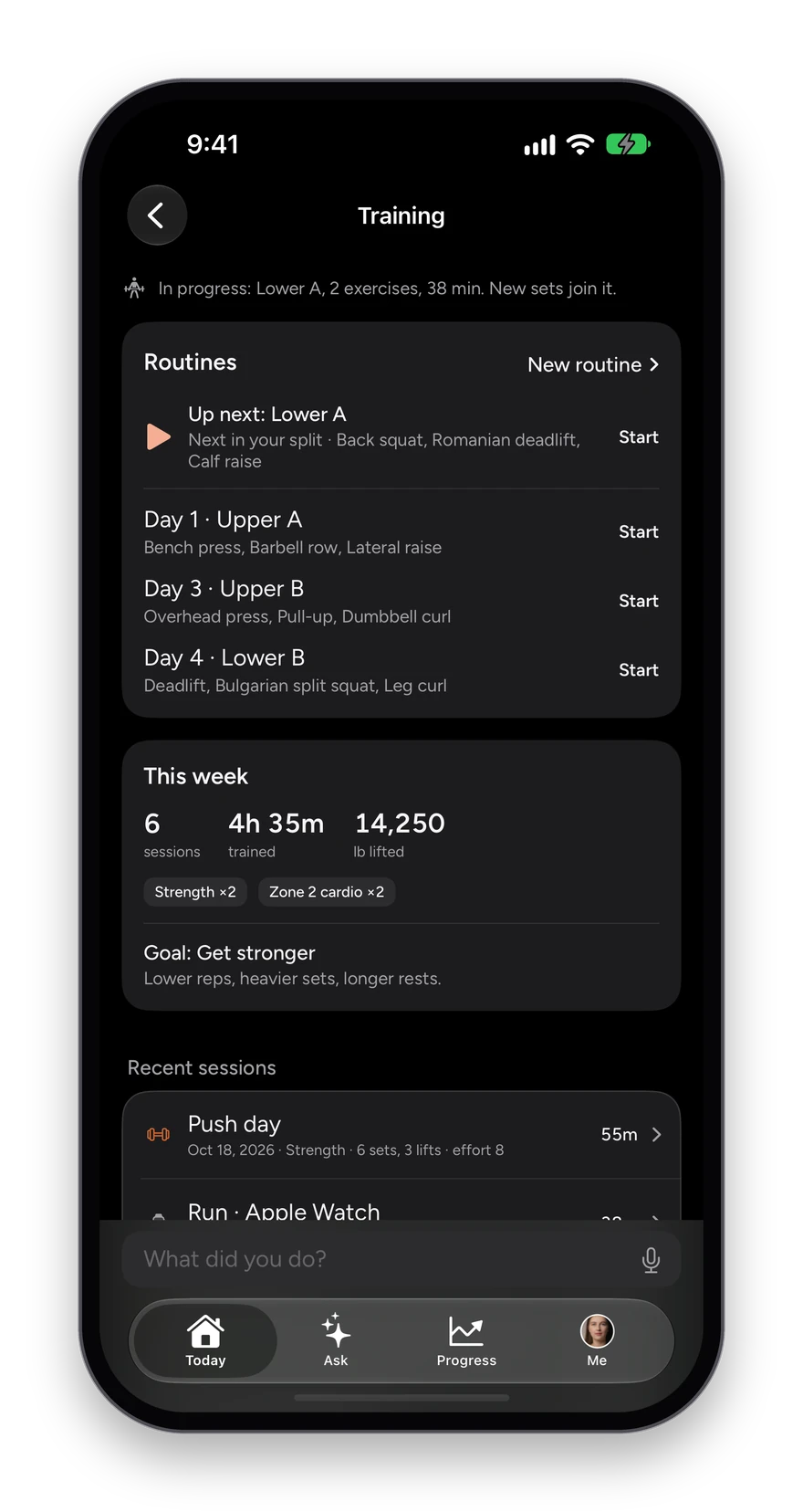
  2. Read this week: sessions, time trained and weight lifted, with the kinds of training you did.
  3. Scroll recent sessions, each with its source, duration, sets and effort.
  4. Say or type a session your watch did not catch in the box at the bottom.

What you see

  • Apple Watch and other synced workouts arrive on their own.
  • Strength sessions keep their sets, lifts and effort.
  • Your training goal on screen, so the week reads against what you are aiming for.
Training: this week 6 sessions, 4h 35m, 14,250 lb lifted, the goal Get stronger, and recent sessions from Apple Watch with sets and effort.
10 · Nutrition

Food and water, logged in seconds.

Nutrition keeps the numbers that matter without making you count every gram. Calories and protein against your targets, water with one tap, and your meals for the day.

How it works

  1. Open Eat from Today, then Food and water.
  2. Read the day: calories against your target, protein against yours, and the active burn from your watch.
  3. Add water with + Glass, + Bottle or + Big bottle.
  4. Say or type a meal in the box at the bottom, or tap its + to scan a barcode or take a photo of the plate. Tap a meal’s row to log into it.

What you see

  • Breakfast, lunch, dinner and snacks, each a tap away.
  • The last four weeks, so one heavy day reads as one day.
  • Targets set from your goals, which you can change.
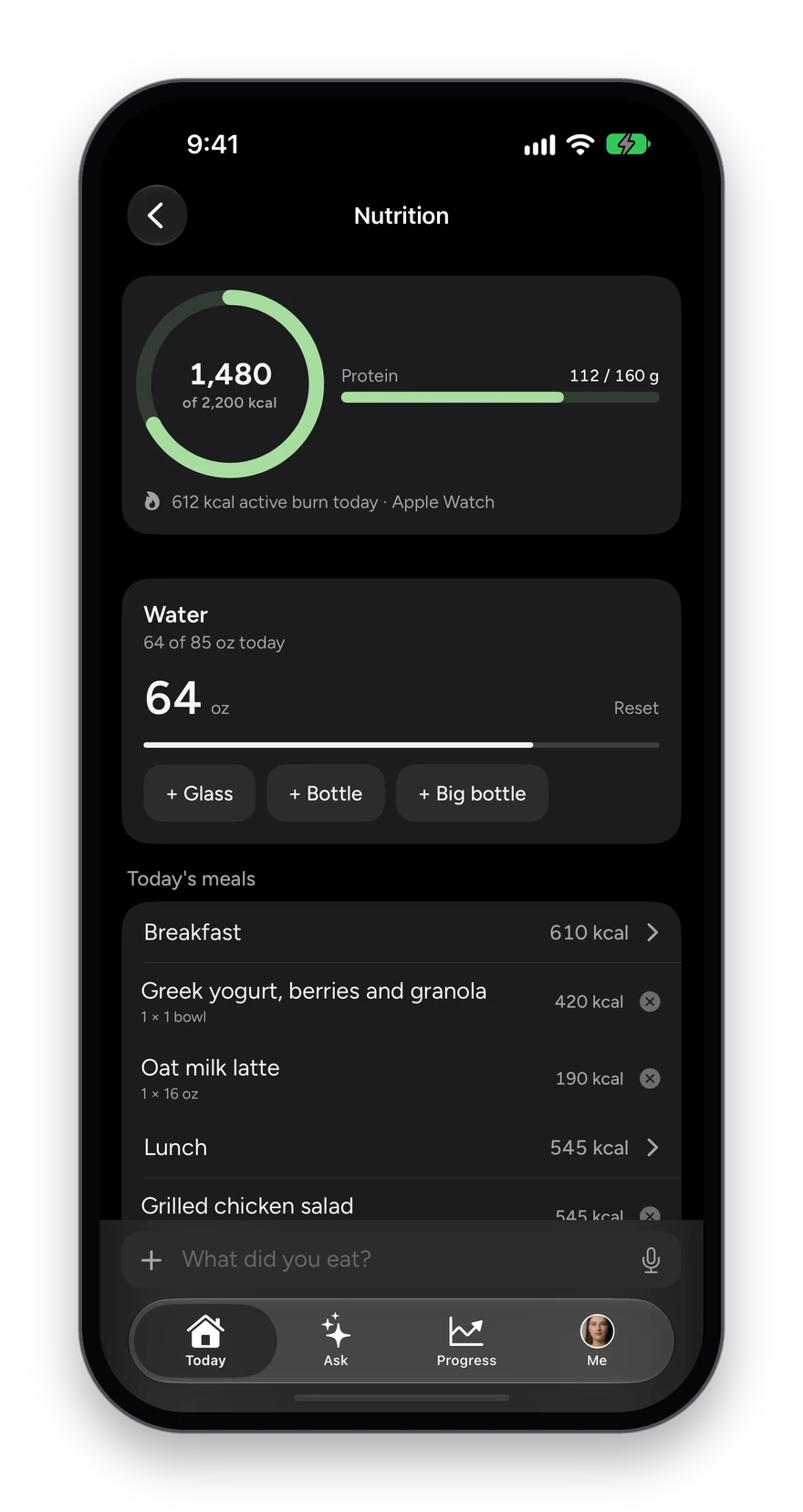
Nutrition: 2,050 of 2,200 kcal, protein 148 of 160 g, active burn from Apple Watch, water with quick-add buttons, and today’s meals.
11 · Bloodwork

Your lab results, charted and kept.

Photograph the result sheet your lab or doctor sends, even a scanned fax. Wave reads it, files every value under its panel with its reference range, and waits for you to confirm each one before it counts.

How it works

  1. Open Me, then Lab results, and tap the plus to add a report, or type a value in by hand.
  2. Check the values Wave read, each shown beside the page it came from.
  3. Keep or discard each one, or Keep all in one tap.
  4. Browse your panels: every marker with its range and whether it sits in range, borderline, optimal or out of range.

What you see

  • Lipid, metabolic and the rest of your panels, each marker on a range bar.
  • Nothing reaches a chart until you have kept it.
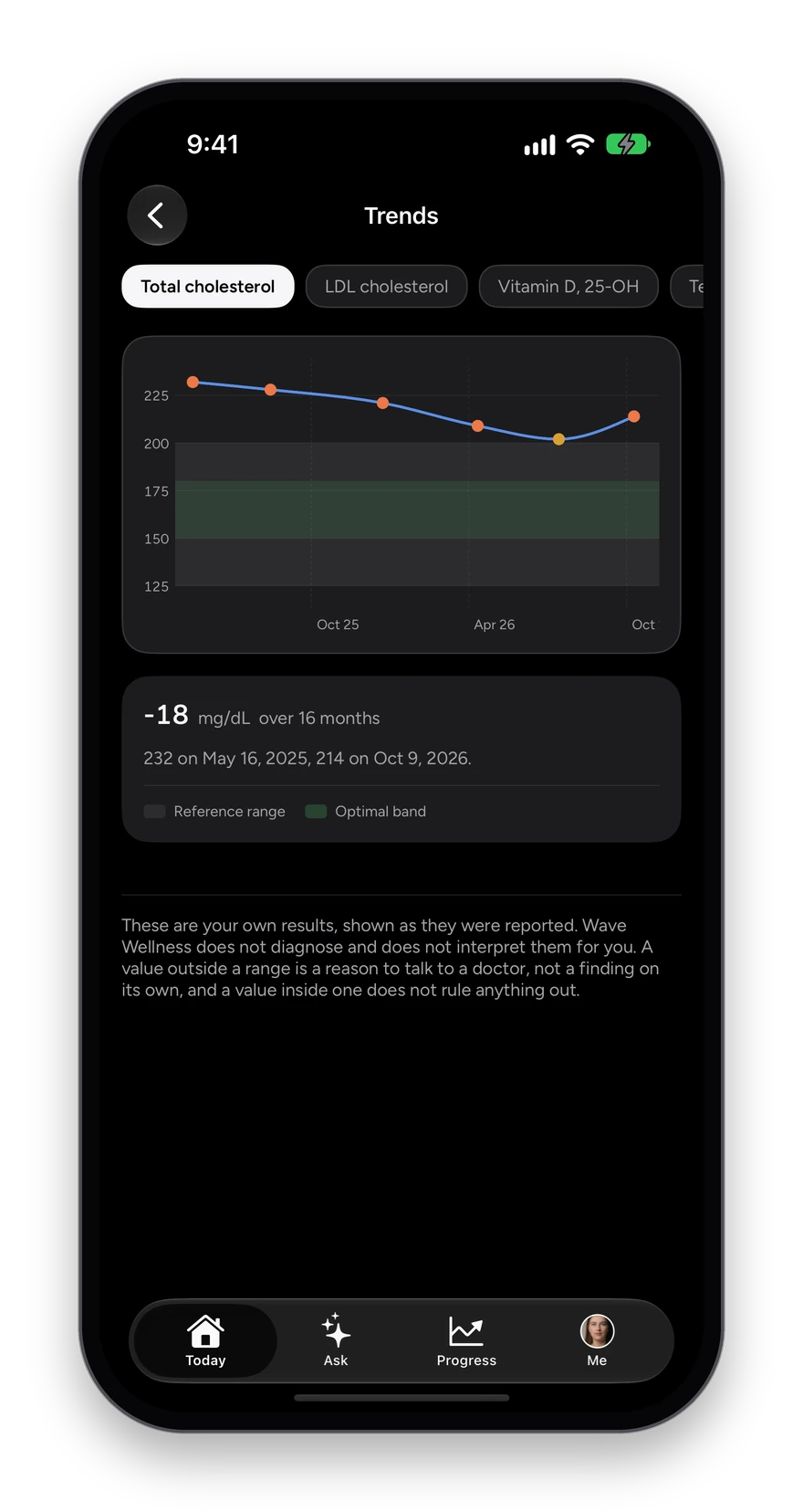
  • Every kept value charts over time in Trends.
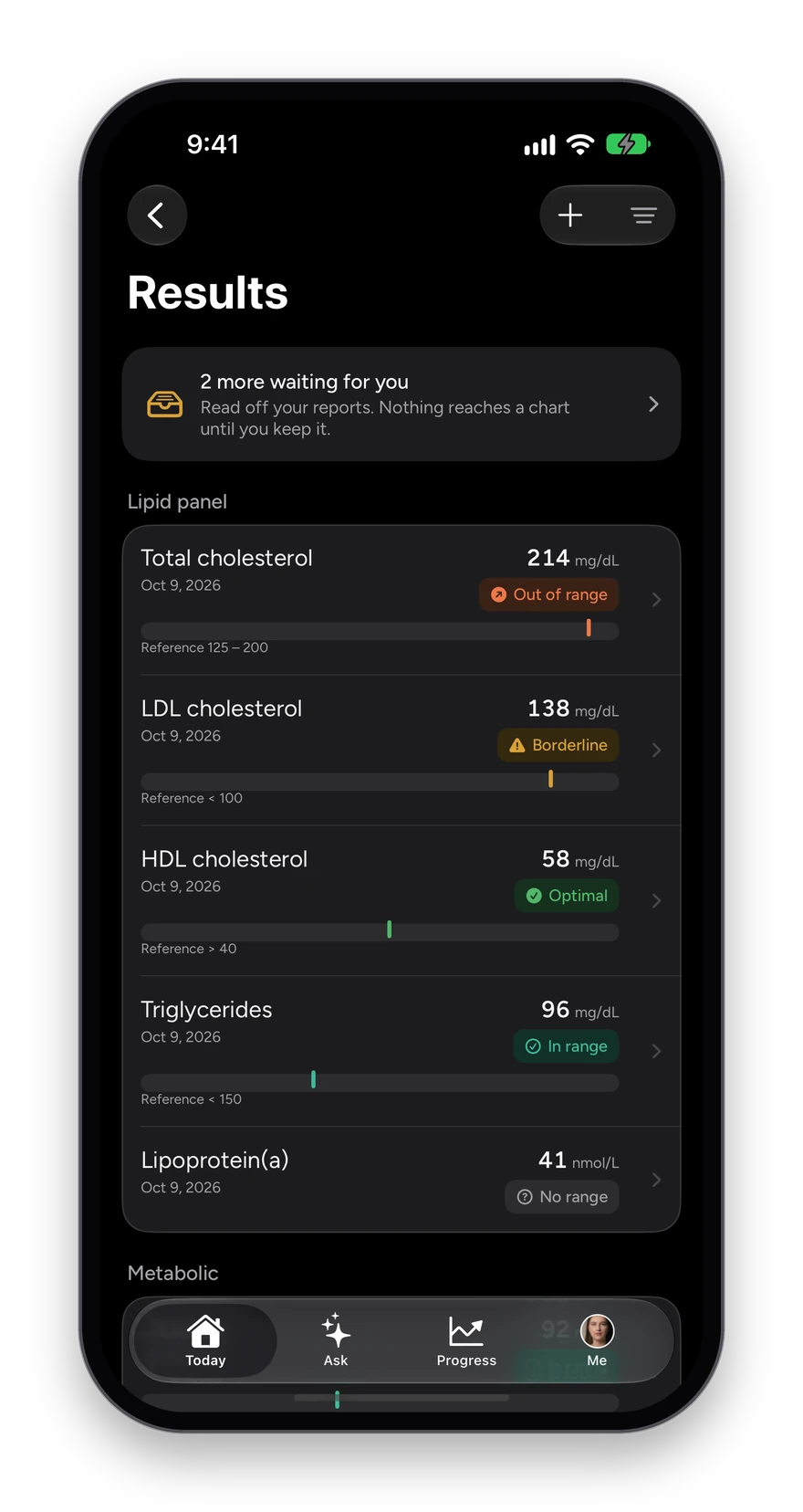
Results: two values waiting for you, then the lipid panel with total cholesterol out of range, LDL borderline, HDL optimal and triglycerides in range, each on a range bar.
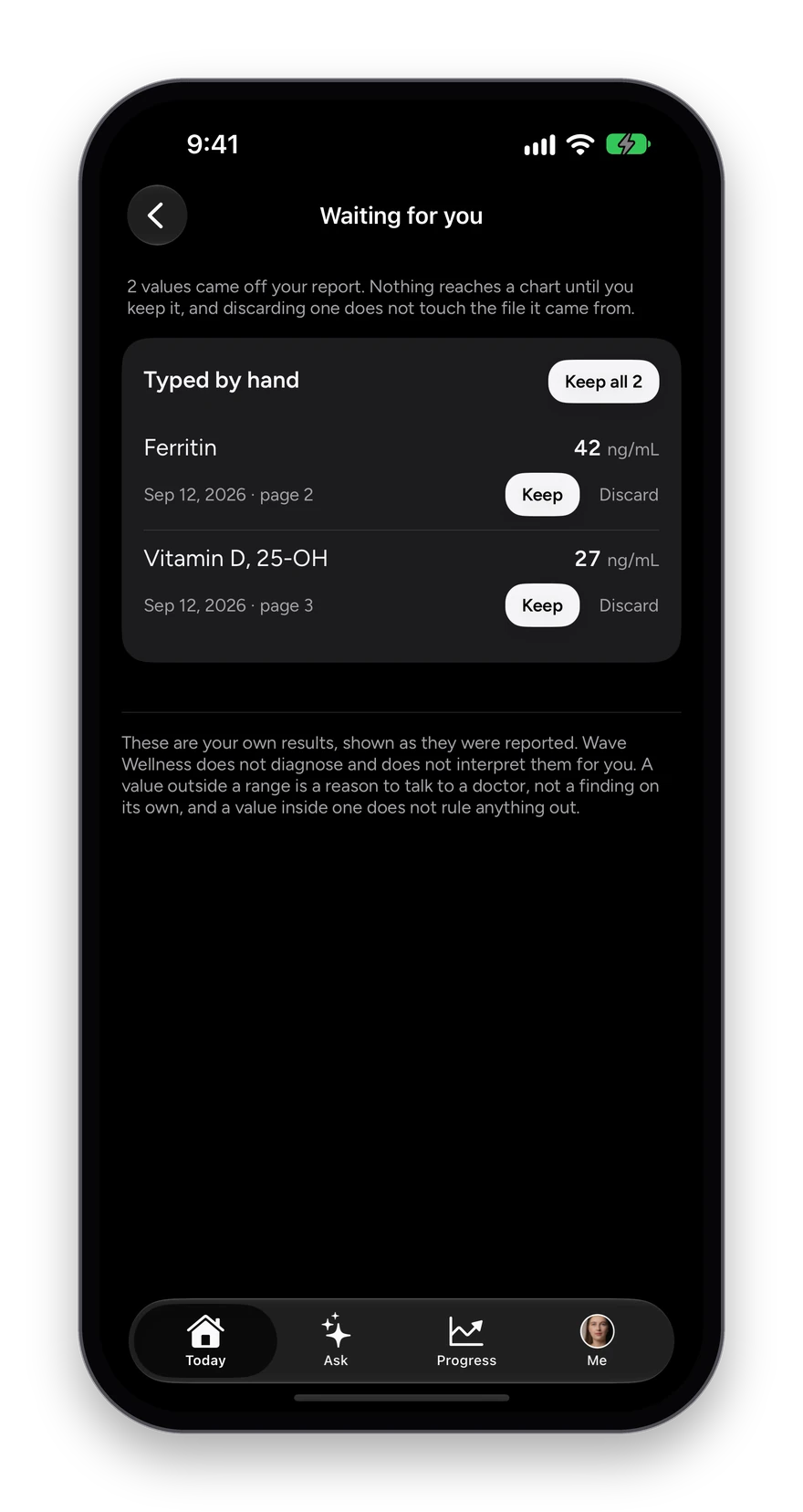
Waiting for you: ferritin and vitamin D read off a report, each with Keep and Discard, and Keep all 2.
12 · Supplements and meds

What you take, and whether you took it.

List your supplements and medications once, with the dose and the time of day. Wave turns them into a daily checklist and keeps four weeks of how it went.

How it works

  1. Tap the plus on Today, then Supplements: photograph the label, scan the barcode or search by name.
  2. Set the dose, the form and when you take it: morning, with food, bedtime.
  3. Each day, tap the circle as you take each one, or skip it.
  4. Watch your four-week adherence and your streak.

What you see

  • A checklist grouped by time of day.
  • Supplements and medications listed separately, each with its dose and timing.
  • Four weeks of adherence, so a regimen you can see is one worth keeping.
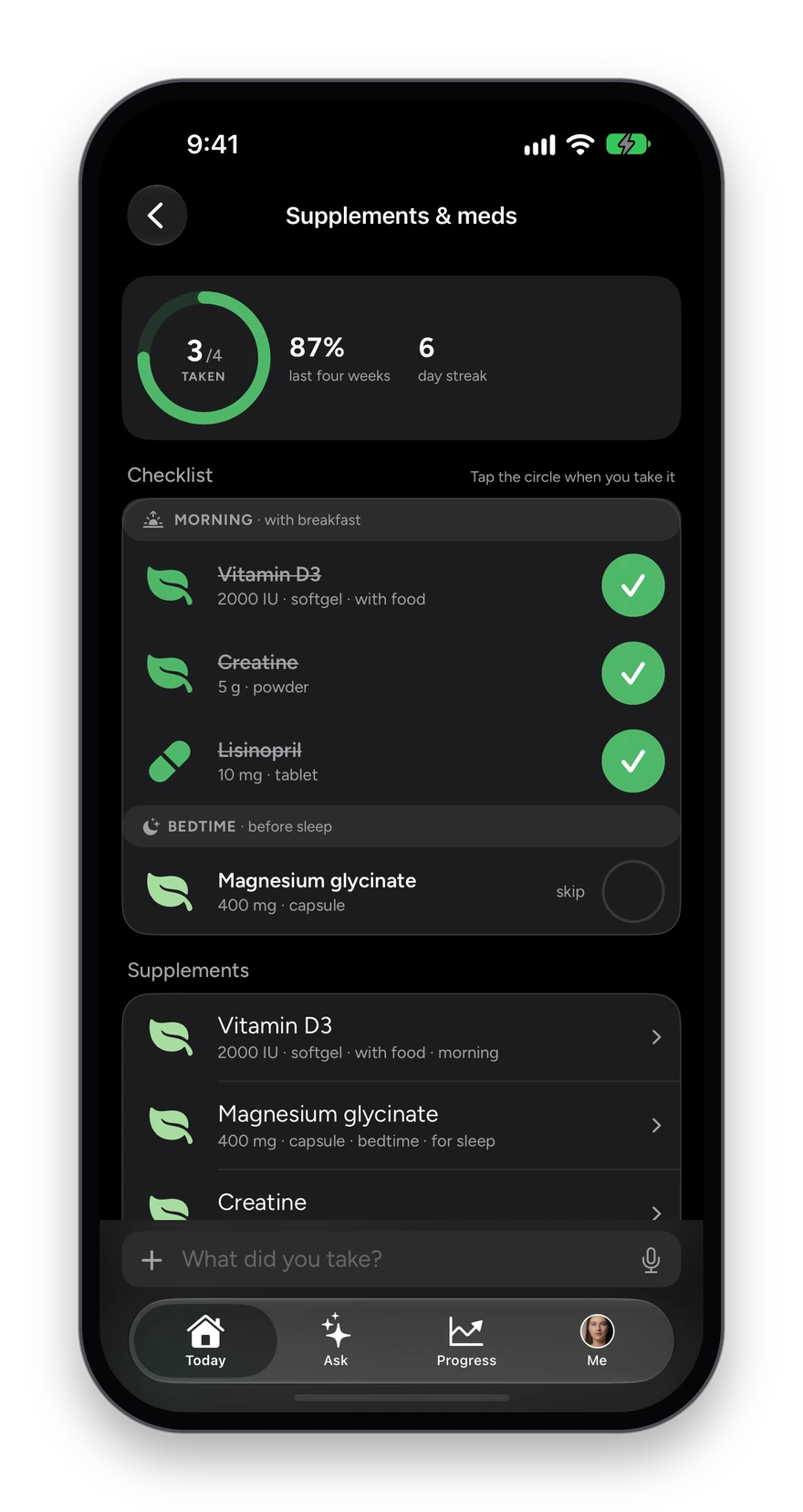
Supplements and meds: 87 percent over the last four weeks, a six-day streak, and a checklist of vitamin D3, creatine, lisinopril and magnesium by time of day.
13 · Goals

Targets you can watch move.

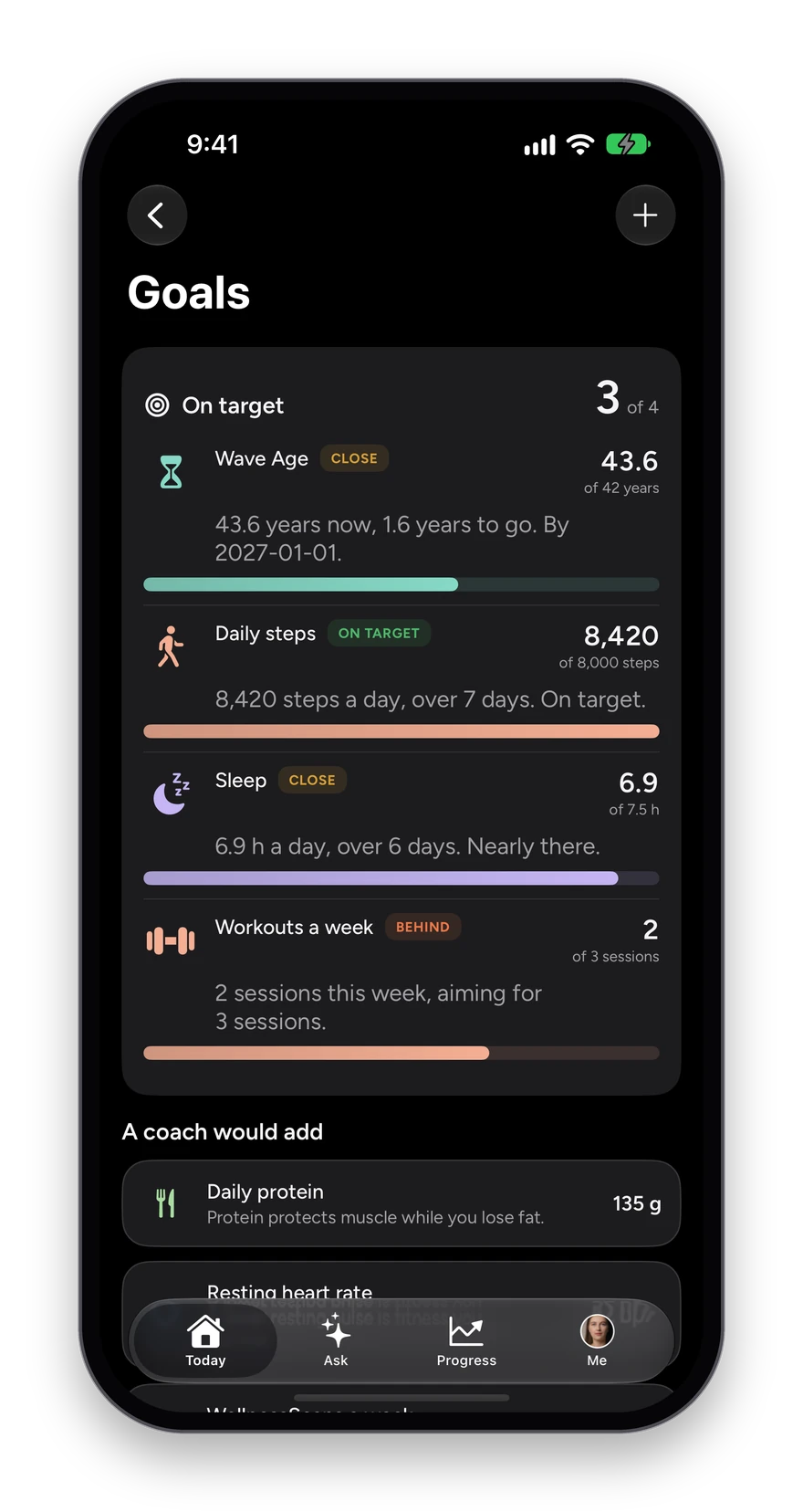
Set a target on your Wave Age, your weight, your steps, your sleep or your workouts a week, and Goals shows the real number traveling toward it, with a plain verdict on each.

How it works

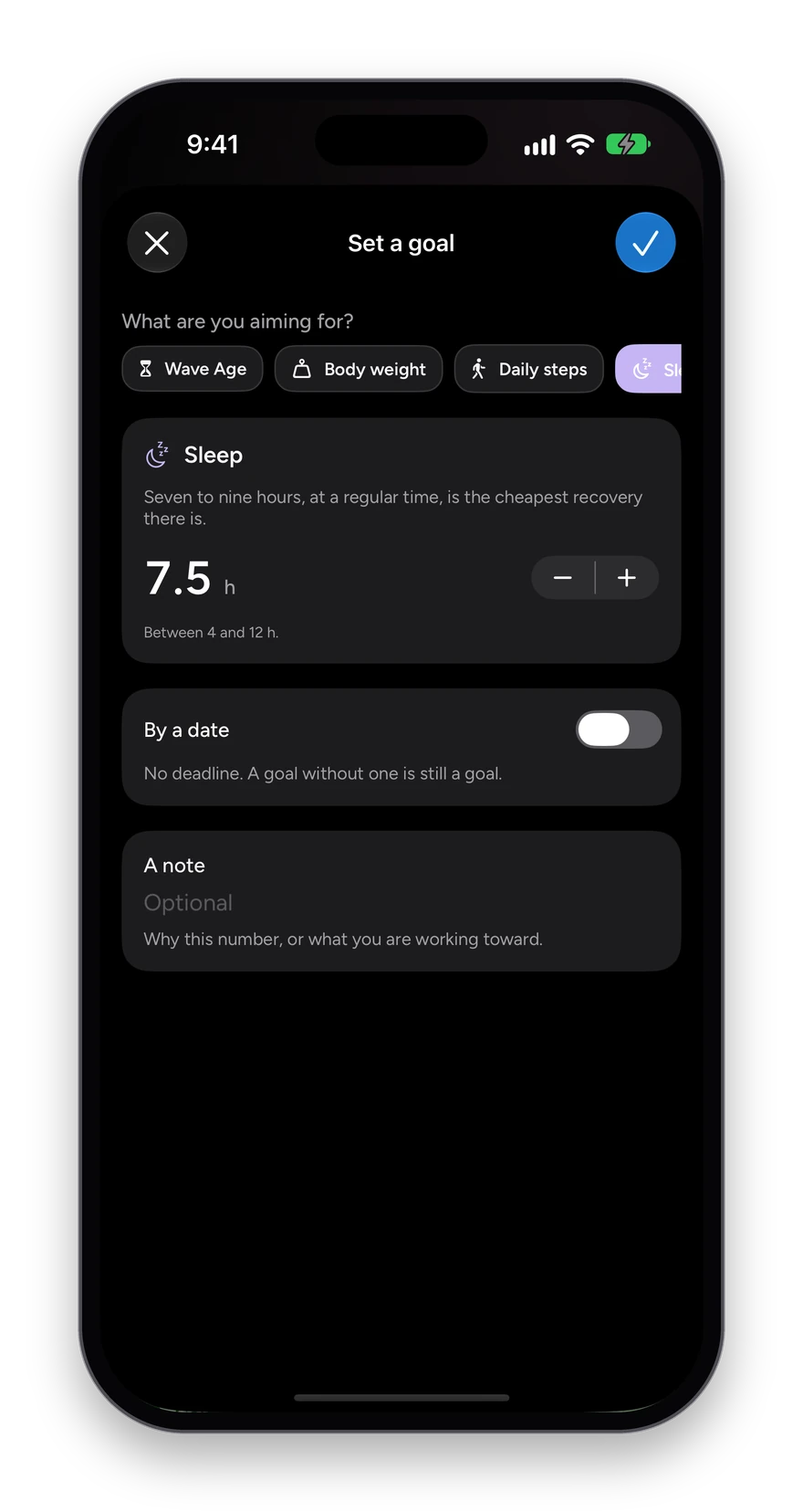
  1. Open Progress, then Goals, and tap the plus.
  2. Choose what you are aiming for and set the target, with or without a date.
  3. Add a note on why, if it helps.
  4. Check Goals any time: each one says On target, Close or Behind, with how far there is to go.

What you see

  • A count of how many goals are on target.
  • Suggestions under A coach would add, such as daily protein.
  • Remove a goal and every reading stays; only the target goes.
Goals: 3 of 4 on target, with Wave Age close, daily steps on target, sleep close and workouts a week behind, and suggestions below.
Set a goal: choose Wave Age, body weight, daily steps or sleep, set 7.5 hours, an optional date and a note.
14 · Mind

How calm you are, and two minutes to change it.

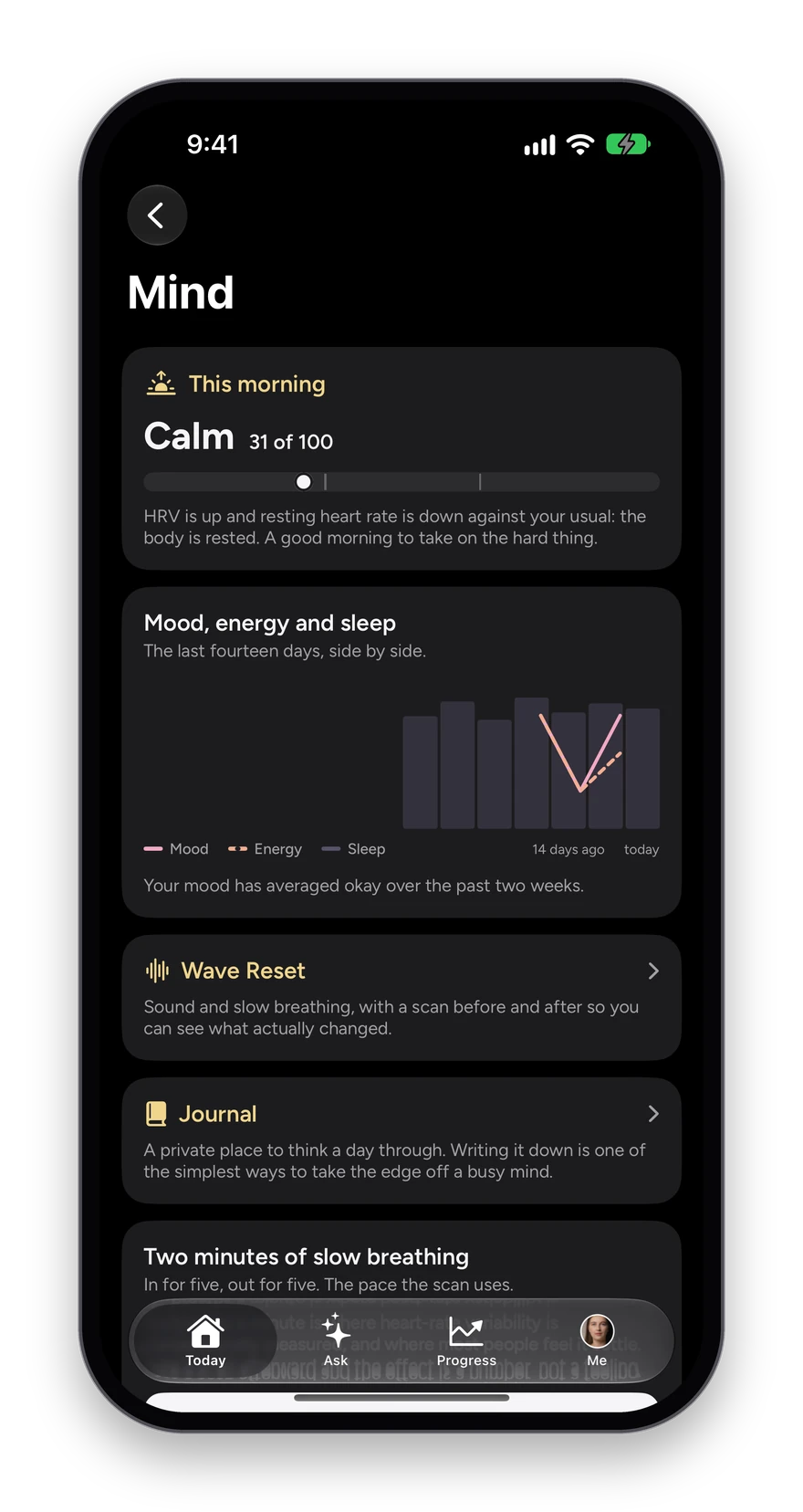
Stress and mood reads this morning’s stress from your heart-rate variability and resting heart rate, sets it beside your mood, energy and sleep, and gives you a guided breathing session when you need one.

How it works

  1. Open Relax from Today, then Stress and mood.
  2. Read this morning’s stress read, Calm, Normal or Strained with a score out of 100, and the sentence explaining it.
  3. See mood, energy and sleep side by side over the last two weeks.
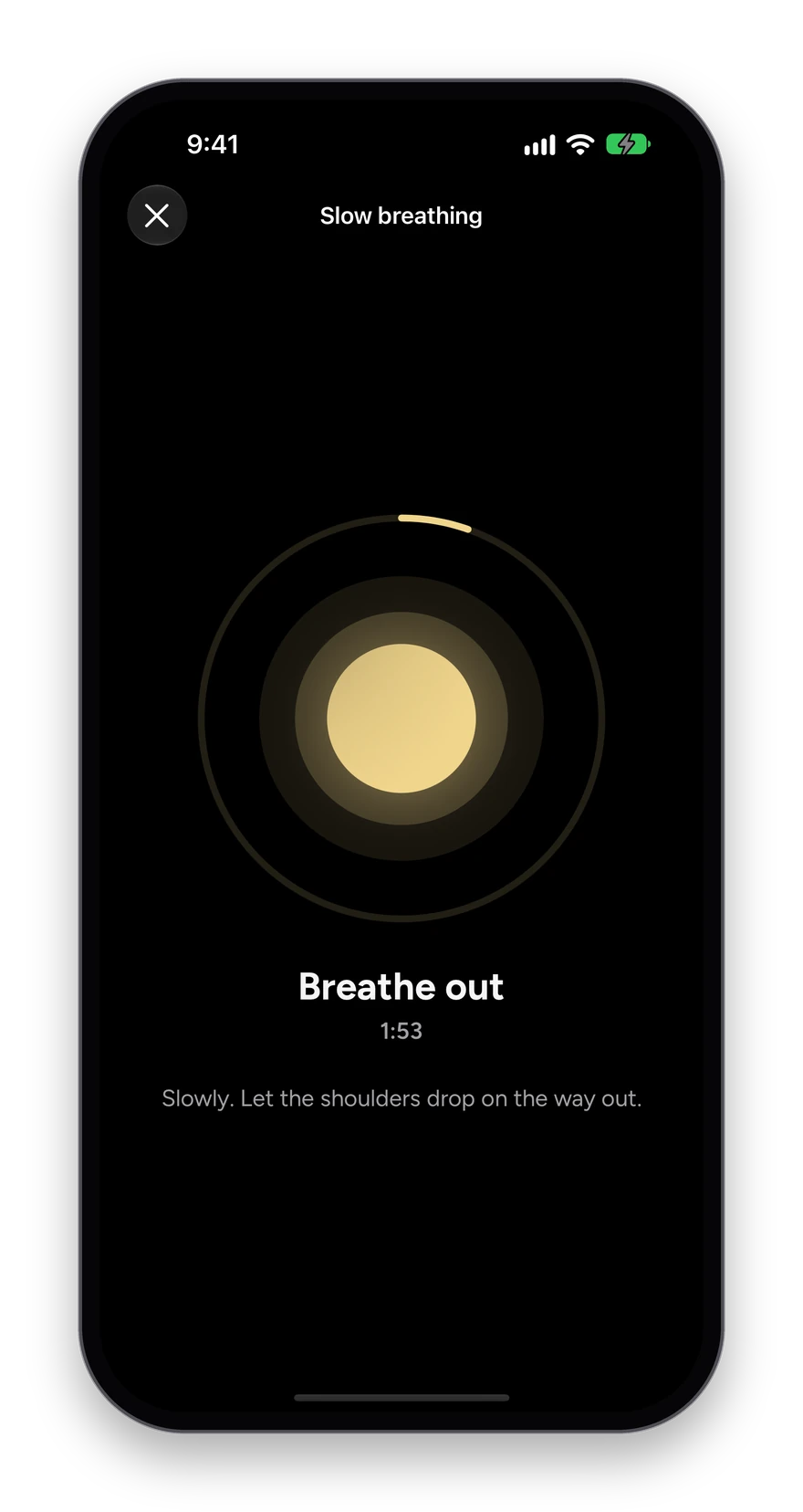
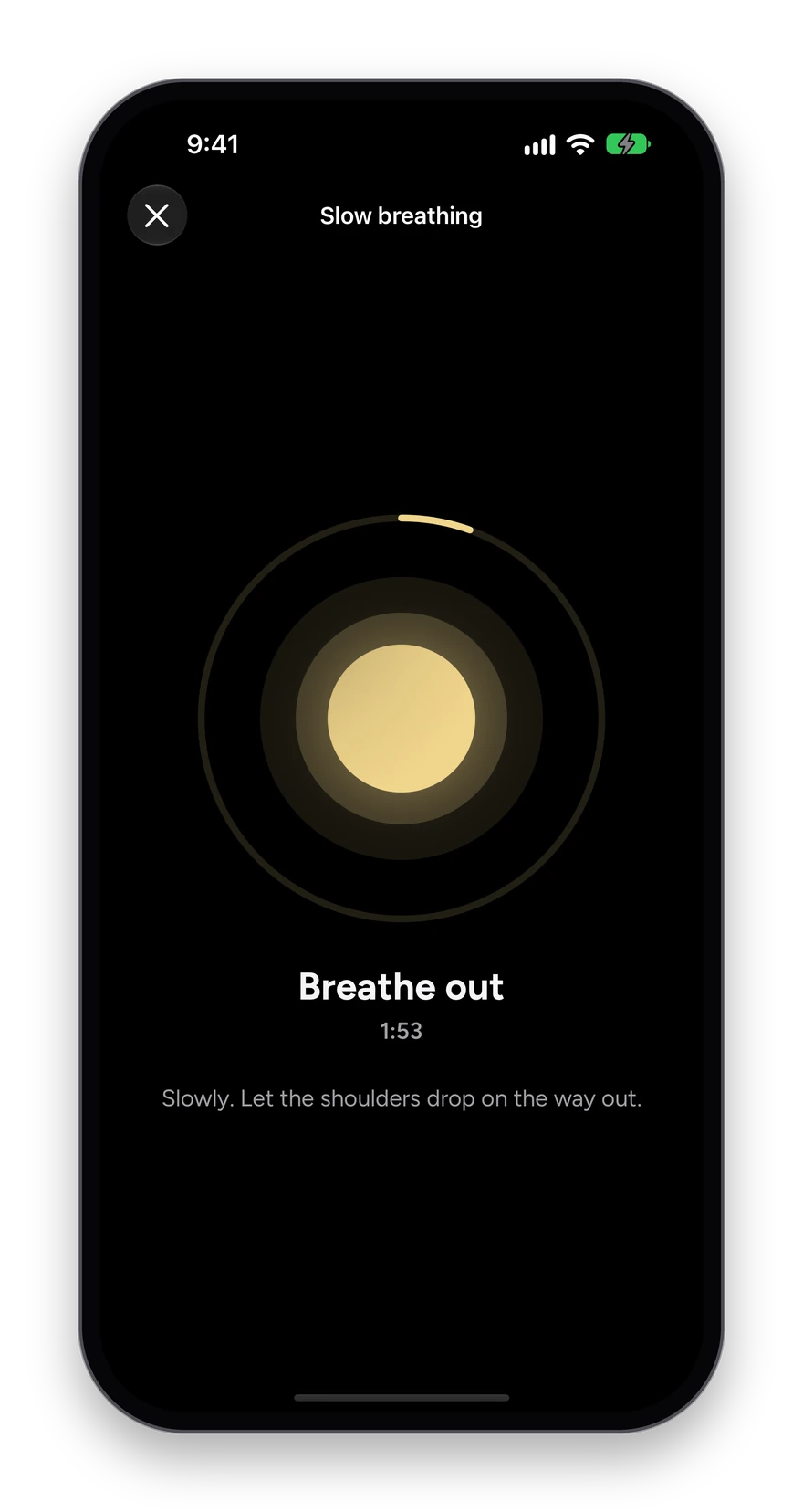
  4. Tap Start two minutes. A glowing circle paces each breath in and out, six breaths a minute, with the time left counting down.

What you see

  • Stress scored 0 to 100 from your body’s own signals.
  • A guided slow-breathing session, at the pace the research behind it uses, with a cue for each breath.
  • Stop any time with the X; a scan afterward shows what the two minutes did.
Mind: this morning Calm 31 of 100, mood, energy and sleep over 14 days, and Two minutes of slow breathing with a Start button.
Slow breathing: a glowing circle pacing the breath, Breathe in, 1:48 left, and Slowly. Let the shoulders drop on the way out.
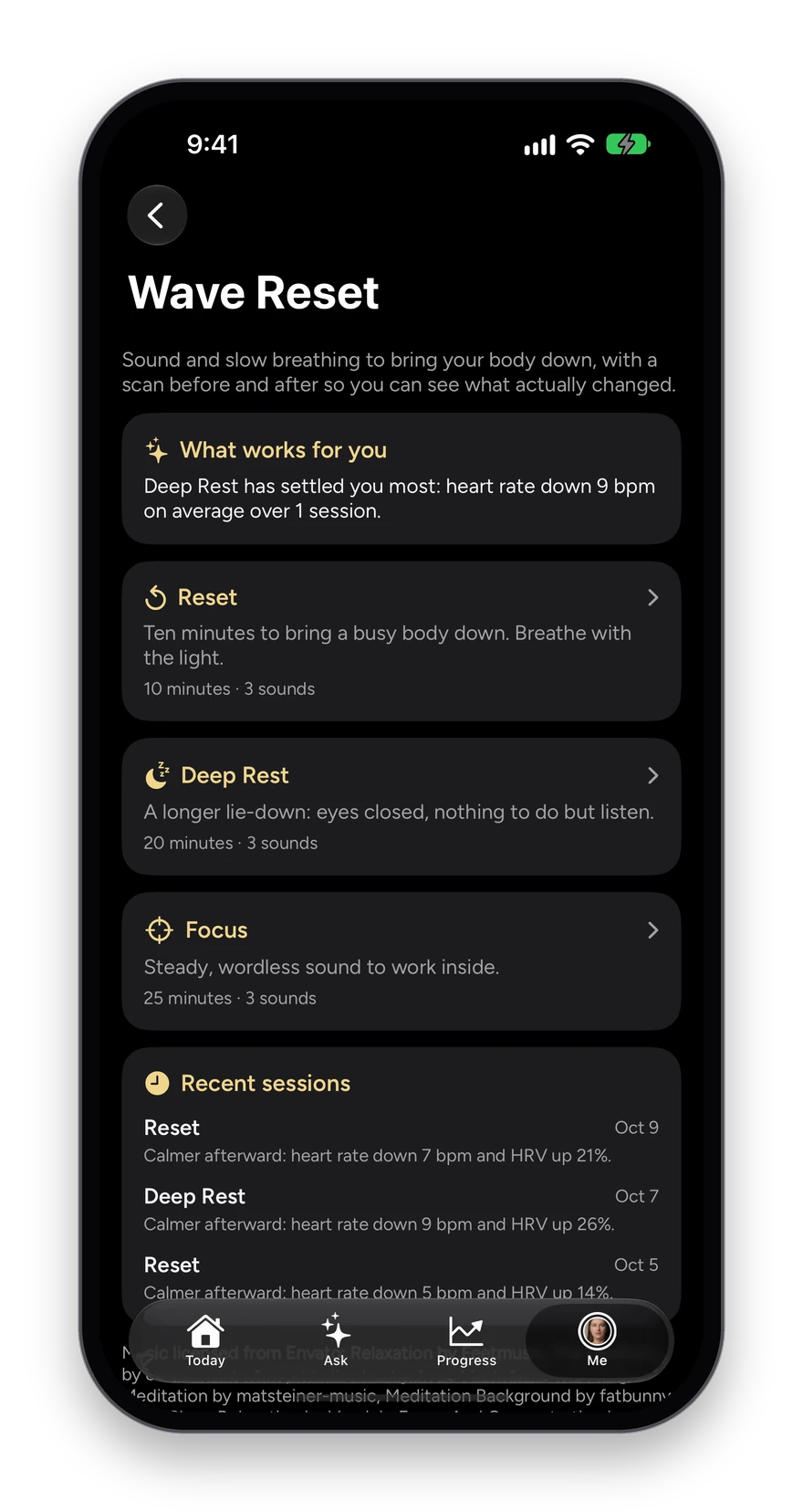
15 · Wave Reset

Ten minutes to settle, and proof that it worked.

Wave Reset is sound and slow breathing to bring a busy body down, with a forty-second scan before and after so you can see what actually changed: heart rate, heart-rate variability and breathing.

How it works

  1. Tap Relax at the top of Today, then Wave Reset.
  2. Pick a mode: Reset for ten minutes, Deep Rest for a longer lie-down, or Focus for steady sound to work inside.
  3. Tap Scan first for a forty-second reading, or Start without a scan.
  4. Follow the light, six breaths a minute, then scan again and read the difference.

What you see

  • What works for you: after a few sessions, the mode that has settled you most, with the average drop in heart rate.
  • Recent sessions listed with their before and after.
  • Licensed music, a breathing light, and a gentle tap on each breath if you want one.
Wave Reset: what works for you, the Reset, Deep Rest and Focus modes, and recent sessions with heart rate down and HRV up after each.
A Reset in progress: a glowing circle pacing the breath, Breathe out, 9:54 left.
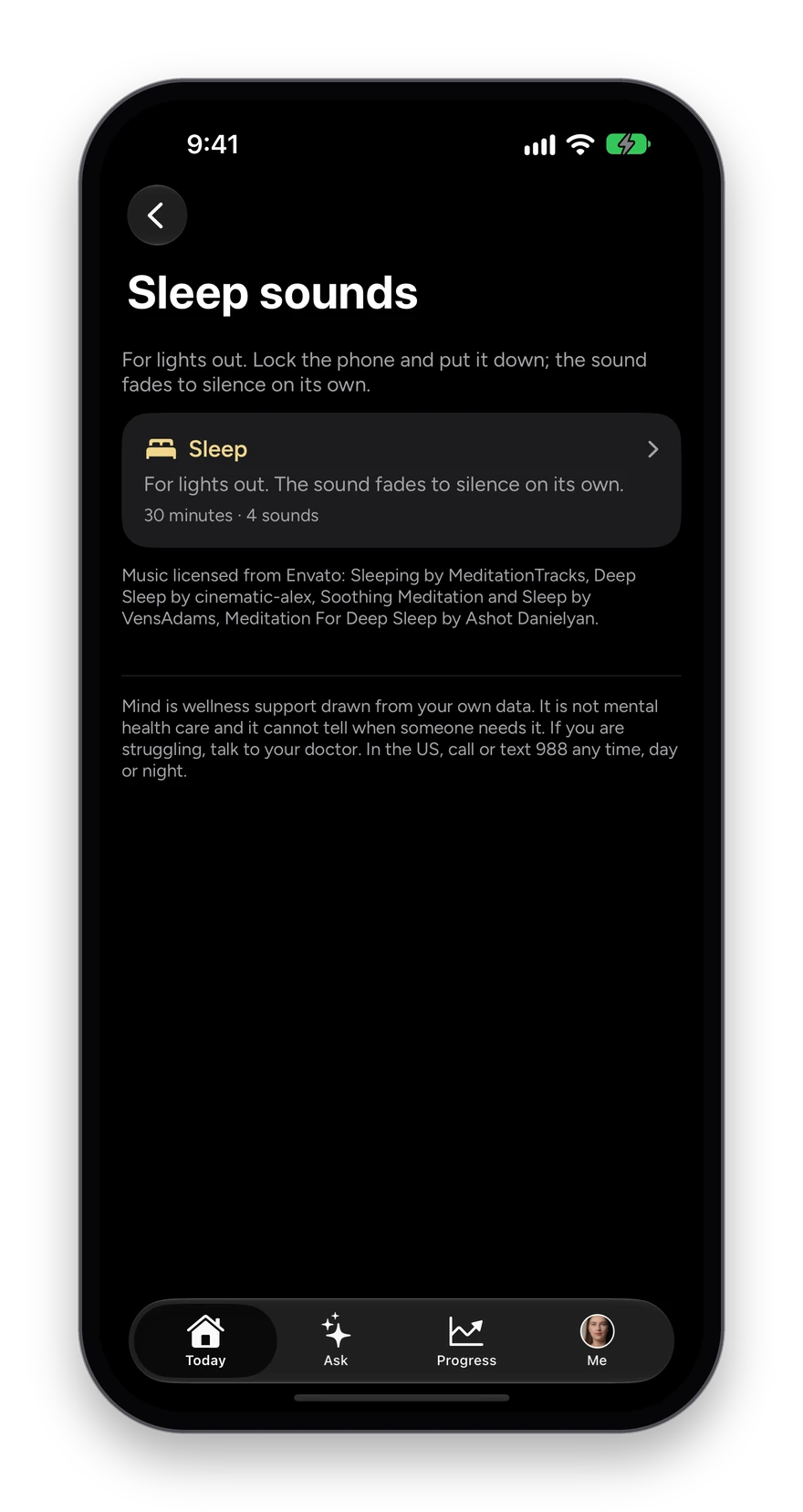
16 · Sleep sounds

Sound for lights out, that knows when to stop.

Sleep sounds sits in its own place under Sleep and Relax. Start it in bed, lock the phone, and the sound fades to silence on its own so nothing wakes you at two in the morning.

How it works

  1. Open Sleep or Relax, then Sleep sounds.
  2. Pick a length: thirty, forty-five or sixty minutes.
  3. Lock the phone and put it down.
  4. The sound fades out over the last five minutes and stops.

What you see

  • Calm, wordless tracks, each one licensed.
  • No breathing cue, because at lights out the job is to stop paying attention.

Read more in the journal

Sleep sounds: For lights out. Lock the phone and put it down; the sound fades to silence on its own. Thirty minutes, four sounds.
17 · Journal

A few lines a day, for nobody but you.

The journal is a private place to think a day through. Writing it down is one of the simplest ways to take the edge off a busy mind, and a prompt each day means you never face an empty page.

How it works

  1. Tap Relax at the top of Today, then Journal.
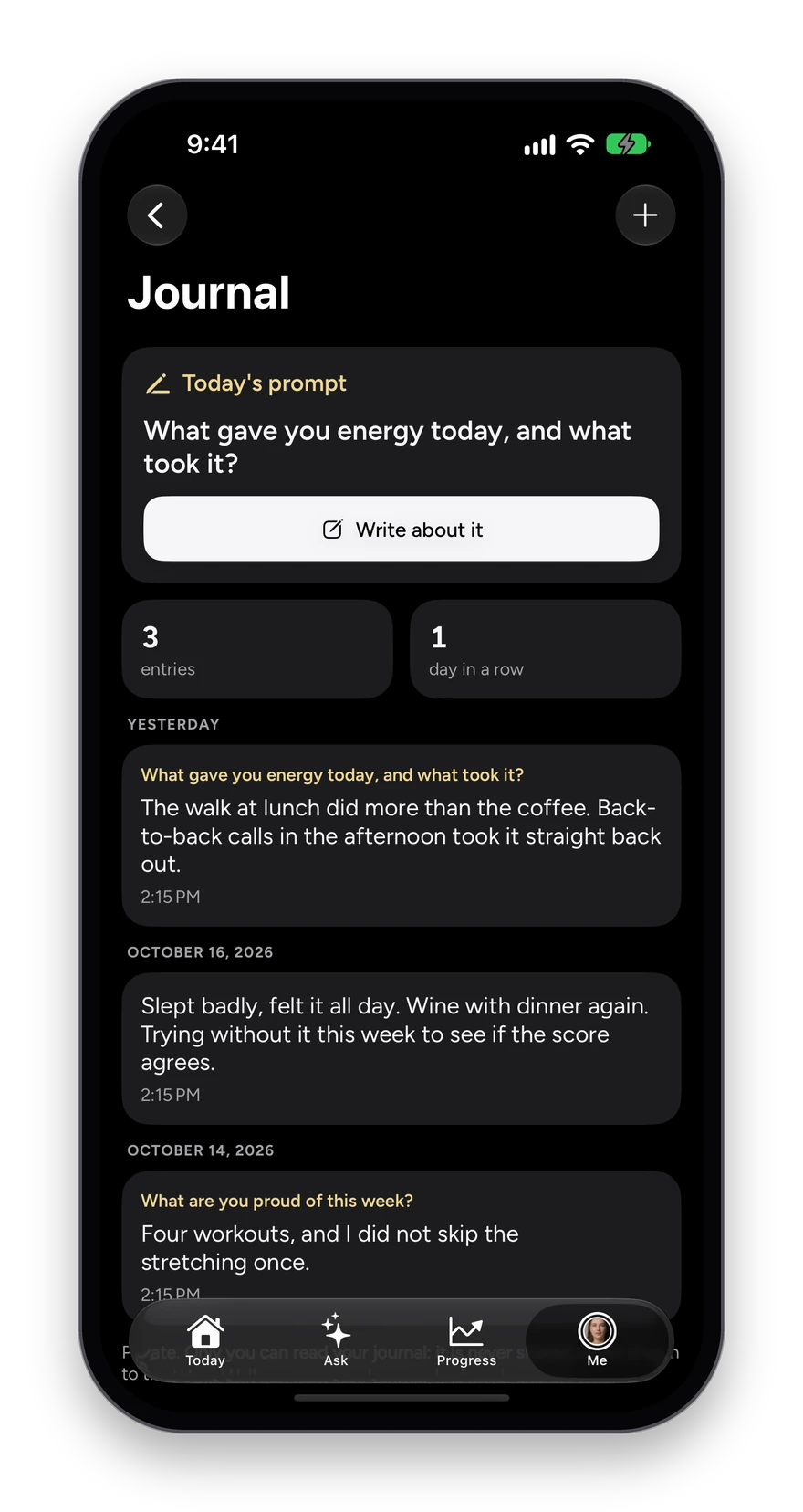
  2. Read today’s prompt, such as “What gave you energy today, and what took it?”, and tap Write about it.
  3. Write as much or as little as you like, or tap the plus to write without a prompt.
  4. Scroll back through every entry by day.

What you see

  • Private: only you can read it. It is never shared, never shown to the Wave Wellness team and never given to the coach.
  • A count of your entries and the days in a row you have written.

Read more in the journal

Journal: today’s prompt, What gave you energy today, and what took it?, three entries and a one-day streak, with entries from yesterday and earlier in the week.
18 · Milestones

The streaks worth sharing, drawn as a card.

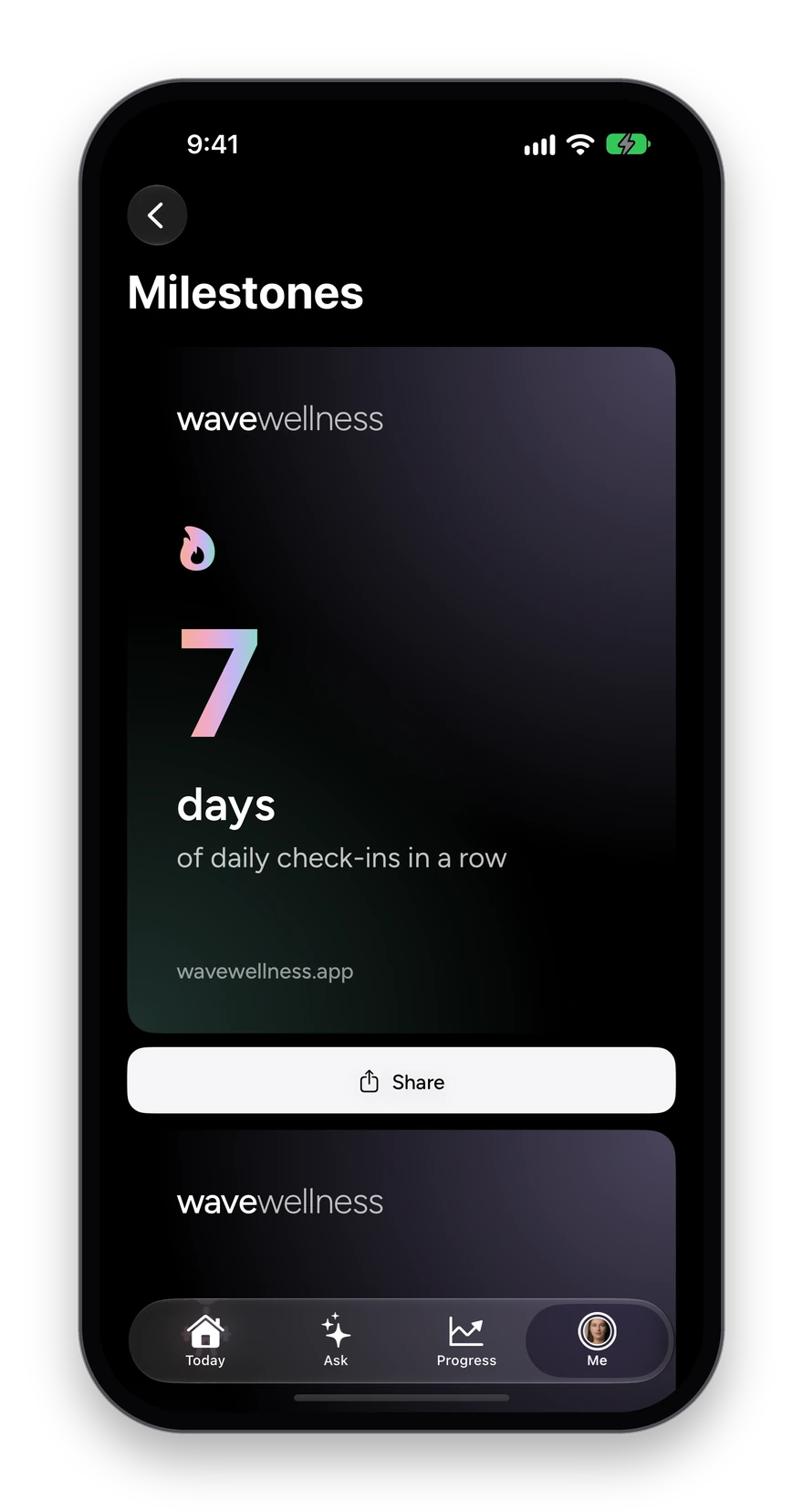
Milestones marks the things worth marking: a week of check-ins in a row, ten workouts logged, a goal reached, two weeks of journaling. Each one is drawn as a card on the phone, ready to share.

How it works

  1. Open Progress, then Milestones.
  2. Swipe through the ones you have earned.
  3. Tap Share to send the card anywhere.

What you see

  • Drawn on your phone, so nothing about you is uploaded to make it.
Milestones: a card reading 7 days of daily check-ins in a row, with a Share button below.
20 · Ask

Ask about your own record.

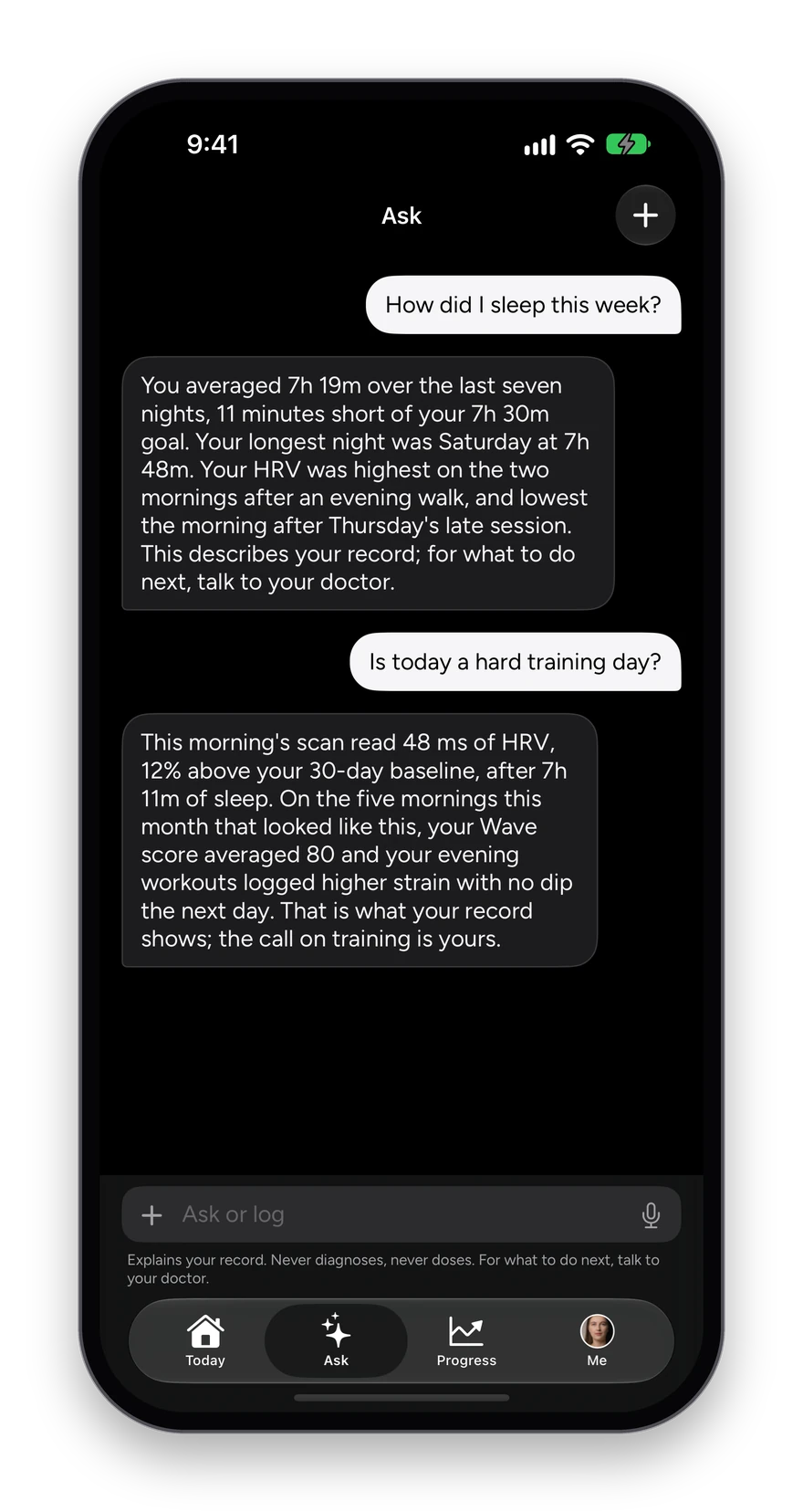
Ask answers questions about your own data in plain English: “How did I sleep this week?” or “Is today a hard training day?” It reads your record and nothing else, and the same box logs whatever you tell it.

How it works

  1. Tap Ask in the bar at the bottom.
  2. Type a question, or tap the microphone and say it.
  3. Read an answer built from your own sleep, training, scans and labs.

What you see

  • Answers from your record only, never the open internet.
  • It explains and describes; it never diagnoses or doses, and points you to your doctor for what to do next.
  • No transcript is kept once you leave the page.
Ask: How did I sleep this week? answered from the week’s data, and Is today a hard training day? answered from recovery and strain.
21 · Wearables

The devices you already own, in one place.

Connect Apple Health on iPhone, or WHOOP on the web, and Wave reads what they record each morning: heart rate, HRV, blood oxygen, sleep and workouts, plus recovery and strain from a WHOOP connection.

How it works

  1. Open Me, then Apple Health, and tap Connect Apple Health. WHOOP connects directly in the web app.
  2. Allow the measurements you want Wave to read.
  3. The Apple Health screen shows each one as a card with the last few weeks behind it.
  4. Tap a card for the full history of that measurement.

What you see

  • Live today: Apple Health, a direct WHOOP connection on the web, and Oura, Garmin and WHOOP on iPhone through Apple Health.
  • A source that cannot report something says so, rather than showing a zero.
  • Health Connect on Android carries Samsung Health, Google Fit and most bands and rings. Fitbit is not offered.

Everything Wave connects to

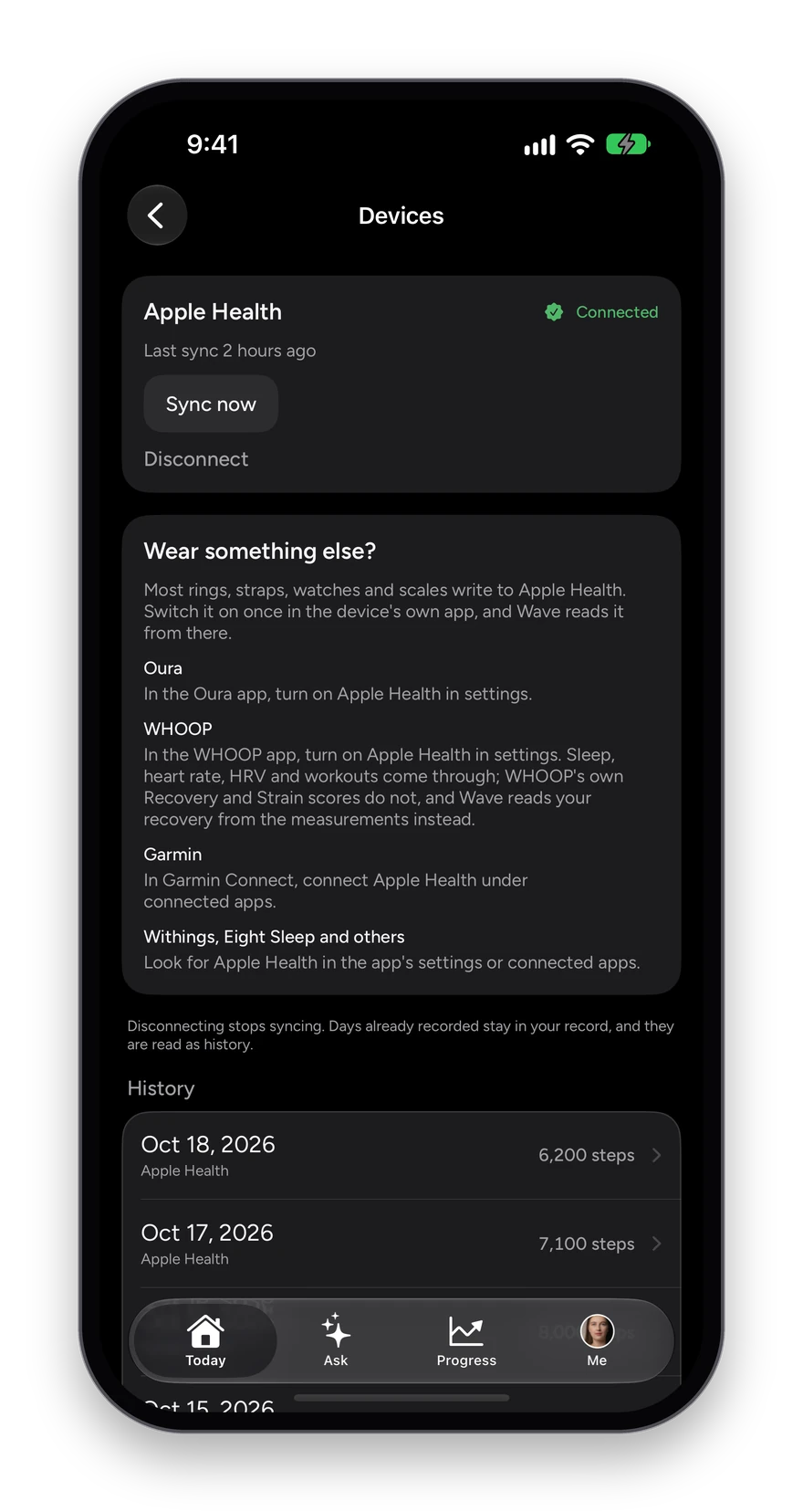
Devices: Apple Health connected, with how to send Oura, WHOOP and Garmin through Apple Health.
22 · Health

Every measurement, one card each.

Health gathers what your devices record into one screen: steps, distance, resting heart rate, HRV, blood oxygen, sleep and workouts, each as a card with the last few weeks behind it. Tap a day for everything it held.

How it works

  1. Open Me, then Apple Health.
  2. Read each measurement as a card with its recent weeks.
  3. Tap a card for its full history, or a day for every reading it held.
  4. Tap Manage devices, the watch icon, to see which device each number came from.

What you see

  • A source that cannot report something says so, rather than showing a zero.
  • Synced readings and your own logs side by side, each labeled.
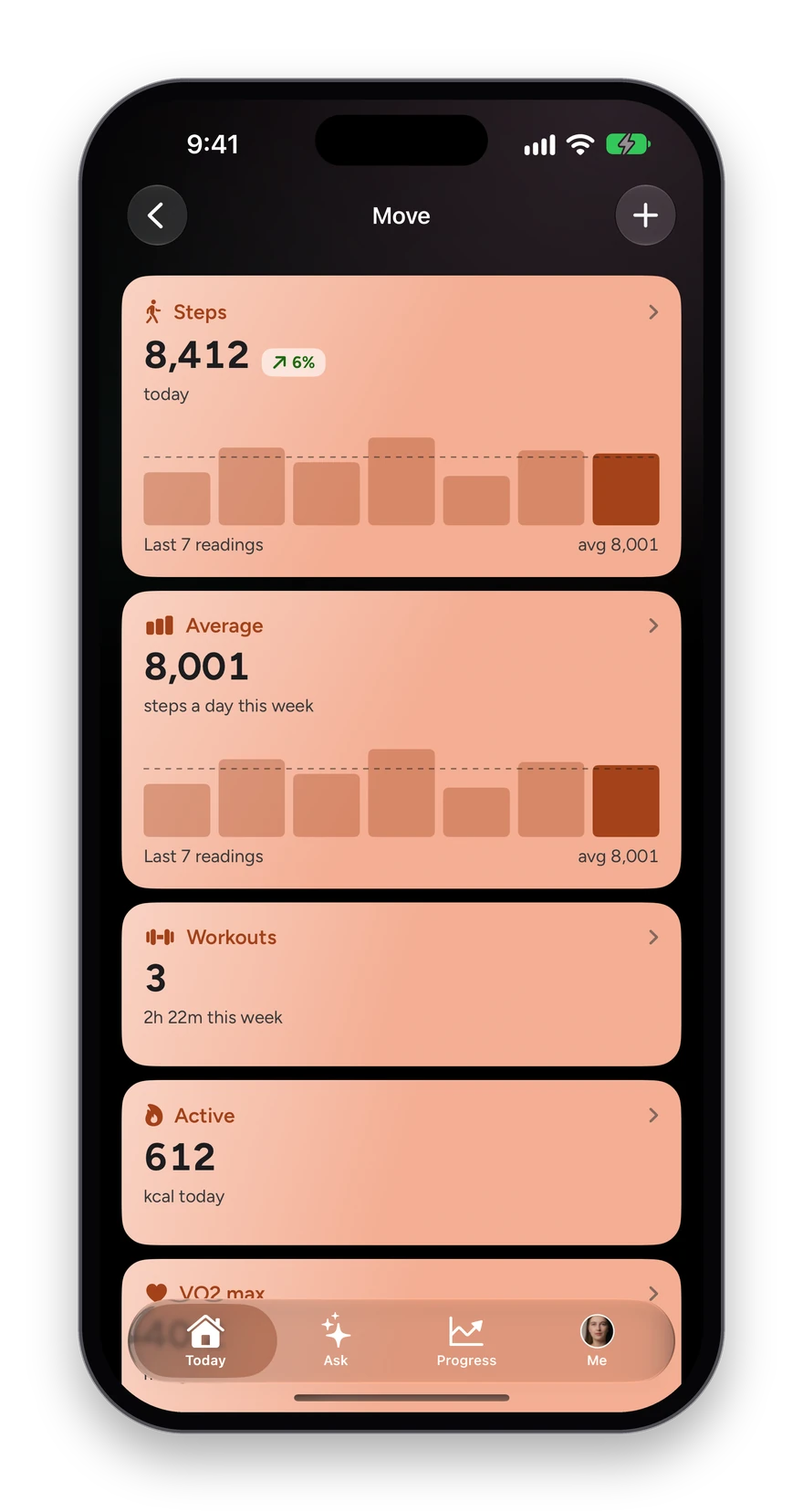
The Move area: steps, average steps, workouts and active energy, each with its week charted.
Devices: Apple Health connected, with how to send Oura, WHOOP and Garmin through Apple Health.
23 · Apple Watch

Your morning, on your wrist.

The Apple Watch app carries today’s Wave and the call for the day, the reason behind it, your top numbers, and a guided breathing session you can start from your wrist.

How it works

  1. Raise your wrist for today’s Wave and the call.
  2. Swipe for today’s numbers.
  3. Swipe again for what moved it, in one sentence.
  4. Start two minutes of slow breathing, paced by a gentle tap.

What you see

  • A complication for your watch face.
  • Kept in step with the phone, so both say the same thing.
The Watch app: today’s Wave at 82, Go all out.
The Watch app: the reason behind today’s Wave.
The Watch app: slow breathing in progress.
24 · iPad, iPhone Duo and the web

One record, on every screen you own.

The same account runs on iPhone, iPad, the folding iPhone Duo and in a web browser. On a wider screen the cards sit two up and the areas spread out, and the WellnessScan works from a laptop camera too.

How it works

  1. Sign in on any device with the same number.
  2. Everything you logged on one is on the others.
  3. On a laptop, open the web app for the same Today, areas and scan.

What you see

  • Two columns on iPad and the open Duo; one on a phone.
  • Nothing to install on a laptop.
The Today screen on iPhone: the four areas, Today’s Wave and Today’s numbers.
Also landing with it

The parts nobody has seen yet.

Built and running, not on a roadmap. Mostly the decisions underneath, which are the ones you feel on the morning something is wrong.

The scan runs in a plain browser

Open the site on a laptop and take the same forty second reading, no app to install. It is the phone’s own signal chain ported step for step and held to the same tests, so a scan from your desk and a scan from your kitchen sit in one history rather than two.

  • No install
  • One history

A Wave Age that refuses to guess

The model needs nine markers. Miss one and it produces no number at all and tells you what to ask for on your next draw, rather than filling the hole with an average and handing you a figure. Every year it does report is attributed to the signal that earned it, with the study the weight comes from.

  • Nine markers or none
  • Every year attributed

Nothing reaches a chart until you say so

A value read off your report waits in a queue with the document it came from, and you keep it or discard it. One tap keeps a whole report. A number nobody has looked at is never plotted, never counted and never quoted back to you.

  • You confirm
  • Whole report in one tap

Photograph the sheet, not just the PDF

A phone picture of a printed result works, and so does a scanned fax. The page is read as a page rather than as flattened text, because the layout is part of the data: some labs mark a value abnormal by which column it sits in, and that is the first thing text extraction throws away.

  • Any lab
  • Photo or PDF
  • Layout kept

Ask keeps no transcript

It answers from your own record and the thread lives only on the page in front of you. A stored conversation becomes a second place your health information piles up, with its own retention and its own export, for very little in return. Deliberate, not missing.

  • Your record only
  • Nothing stored

Your baseline, never a population average

This morning is read against your own last thirty days. Under a week of readings it says so and gives you a range instead of a verdict, and on a morning with nothing in it you get no call at all rather than a confident one built on yesterday.

  • Your own median
  • Silent when it should be
Every screen you own

One record. Every device.

iPhone, Apple Watch, iPad, Android and the web, and the iPhone Duo, all available now. One account, one record, on all of them.

Wave Wellness in a browser on a laptop: Today's Wave at 82, Go all out, with the four areas above it and today's numbers below.

The web app, signed in. Every screen on this page is there too.

Available now, on all six at once

Free on the App Store, or sign in on the web. One account, one record, on whichever of these you carry.

iPhone

iOS 18 or later

The morning WellnessScan, Apple Health and every screen on this site.

Available nowGet it on the App Store

Apple Watch

watchOS 11 or later

Today's Wave, what moved it, a minute of breathing, and complications for your face.

Available nowGet it on the App Store

Web

Any modern browser

Your whole record, nothing to install.

Available nowOpen the web app

Mac

Any browser on macOS

The same record on the same account. A native layout is next.

Available nowOpen the web app

iPad

iPadOS 18 or later

The iPhone app runs here. A layout that uses the width is next.

Available nowGet it on the App Store

iPhone Duo

Both displays, day one

The cover screen closed, the whole inner display open.

Available nowGet it on the App Store

Android Live on Google Play. Bring the watch or ring you already wear through Health Connect.

What it is not

Not a medical device. A wellness app that is honest about that.

Every number in Wave is a wellness measurement, stored as one. The insights describe patterns in your own data. They never diagnose, they never prescribe, and they never replace your doctor. The app says so wherever a number could be mistaken for more than it is.

  • Each reading says what it is, how it was read and what it means.
  • Lab values count only after you have confirmed them.
  • Nothing is invented for a signal that is not there.
The Trends screen: a lab marker charted over time against your own range.

Free during beta, and free after it.

Free on the App Store and Google Play. iPhone, Apple Watch, iPad, Android and the web.